Sage vs FreeAgent: Best Accounting Software for UK Freelancers and Sole Traders 2026?
Sage vs FreeAgent compared for UK freelancers, contractors, and sole traders. Pricing, Self Assessment, MTD, time tracking, invoicing, bank feeds, and which is right for your business in 2026.
Ledger Businesses is reader-supported. When you buy through links on our site, we may earn an affiliate commission at no extra cost to you. Learn more.
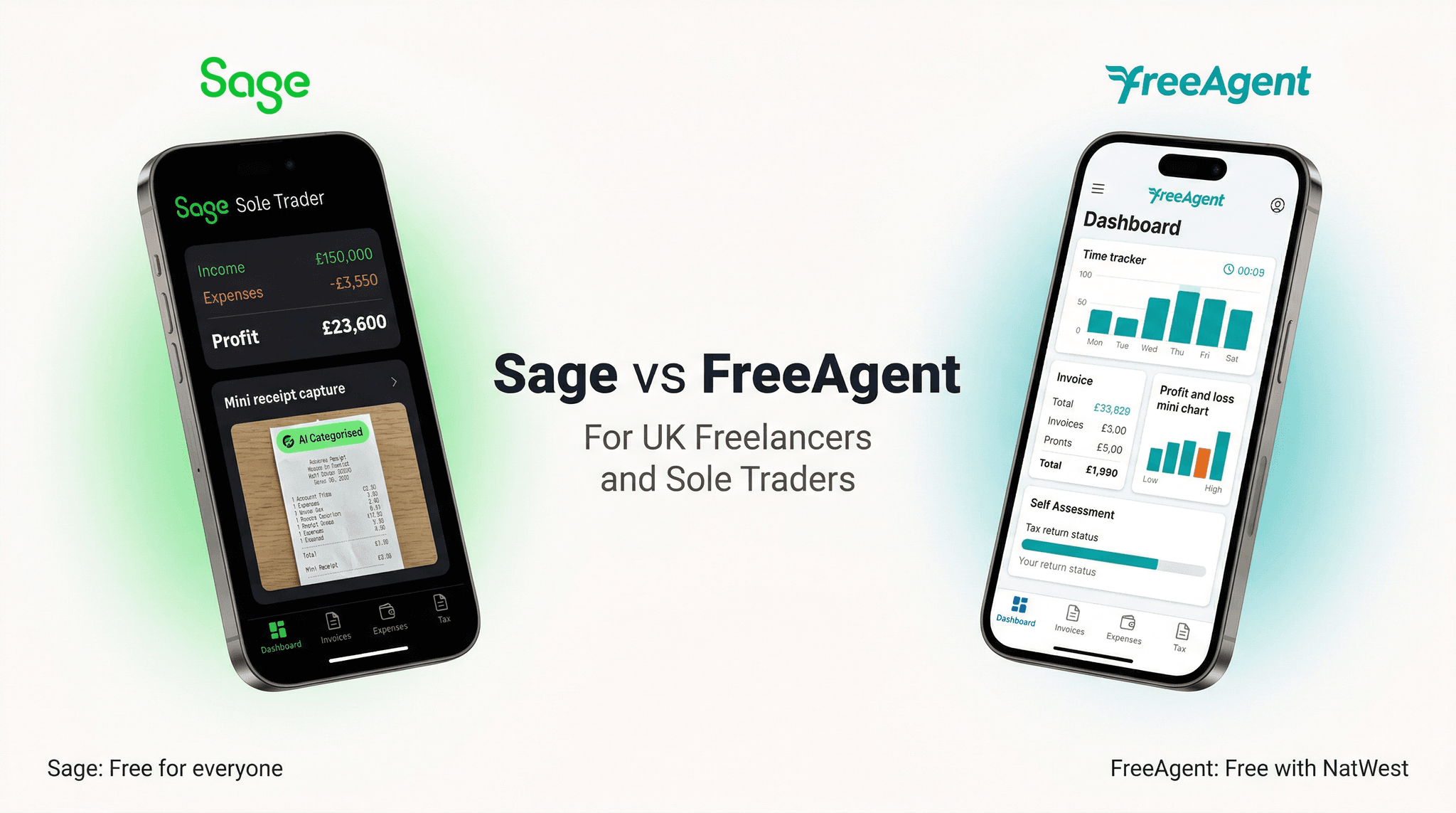
FreeAgent and Sage are aiming at overlapping but distinct audiences. FreeAgent was purpose-built for freelancers, IT contractors, and sole traders — a product designed from the ground up around the specific tax and financial management needs of the self-employed in the UK. Sage's offering for this audience spans from a free Sole Trader plan through to the full Sage Accounting suite, with a clear upgrade path as businesses grow.
This comparison is focused on the freelance and sole trader use case. We evaluate both platforms on the dimensions that matter most to self-employed professionals: cost (including FreeAgent's free-for-bank-customers offer), Self Assessment support, MTD compliance, time tracking, project management, invoicing, and the practicalities of day-to-day use.
FreeAgent is the more purpose-built solution for freelancers and contractors, with time tracking, project management, and Self Assessment handling that reflects deep expertise in this market. If you bank with NatWest or RBS, it is also completely free. Sage wins on the upgrade path — you can grow from free Sole Trader through to enterprise Intacct within one ecosystem — and on AI-powered MTD automation. For a freelancer who banks with NatWest, FreeAgent is an exceptional free option. For everyone else, the choice is closer.
The FreeAgent Free Offer: What You Need to Know
FreeAgent's most compelling proposition for many UK self-employed professionals is its free access through NatWest Group banks. If you hold a business account with NatWest, Royal Bank of Scotland (RBS), or Ulster Bank, you qualify for FreeAgent at no additional cost. This is a genuine, full-featured account — not a limited trial or entry-level tier. The same FreeAgent product that normally costs £19–£34 per month is available entirely free through these banking relationships.
FreeAgent was acquired by NatWest Group in 2018, and the banking group has maintained the free-for-customers commitment since the acquisition. If you are currently a NatWest or RBS business banking customer, or considering opening a business account with either bank, this offer should be a significant factor in your accounting software decision — it represents £228–£408 in annual savings compared to paying the standard subscription.
For non-NatWest/RBS customers, FreeAgent is priced at approximately £19/month for sole traders and £34/month for limited companies. These prices position it at the mid-market of the freelancer accounting software segment.
Sage Sole Trader: The Free Alternative
Sage has its own free offering for the sole trader market: Sage Sole Trader, which provides basic invoicing, income and expense tracking, and MTD-compliant record-keeping at no cost. The free plan is genuinely free — not a time-limited trial — and provides enough functionality for the simplest sole trader operations.
However, Sage Sole Trader's free plan has meaningful limitations. It does not include bank feeds (automatic bank transaction imports), does not handle Self Assessment tax return preparation, and lacks project tracking or time logging. For a freelancer who wants a complete picture of their business finances, the free plan requires manual data entry and lacks the key features that make accounting software genuinely useful.
Sage does offer a paid upgrade for sole traders — Sage Accounting Start at £15/month — which adds bank feeds, full MTD VAT compliance, and Sage Copilot AI. For most freelancers who want automation and genuine efficiency, the £15/month plan is the relevant Sage product rather than the free tier.
Pricing Comparison
| Plan | Sage | FreeAgent | Notes |
|---|---|---|---|
| Free tier | Sage Sole Trader (free) | FreeAgent free (NatWest/RBS customers) | Sage free is limited; FreeAgent free is full-featured |
| Entry paid | £15/mo (Accounting Start) | ~£19/mo (Sole Trader plan) | Sage cheaper by £4/mo |
| Standard | £30/mo (Accounting Standard) | ~£34/mo (Limited Company plan) | Sage cheaper; includes payroll |
| Advanced / growth | £59/mo (Accounting Plus) | No equivalent (FreeAgent is SME-focused) | Sage has a clear scale-up path |
At standard pricing (excluding the NatWest/RBS free offer), Sage is marginally cheaper than FreeAgent across most tiers. The key differentiator is FreeAgent's banking partnership, which makes it free for NatWest Group customers. For everyone else, pricing is comparable — Sage edges ahead by a few pounds per month.
Self Assessment: A Critical Feature for Freelancers
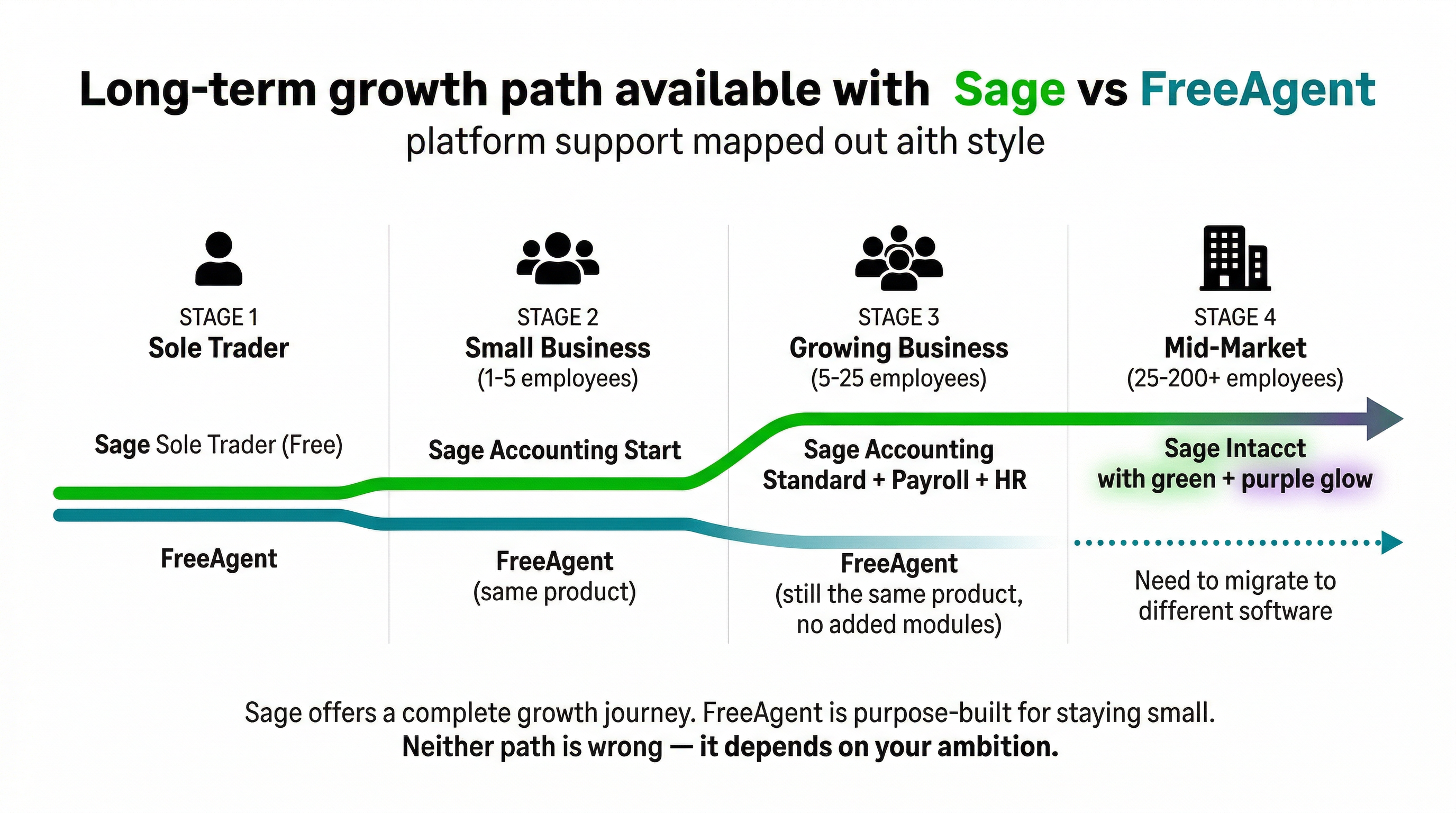
For UK sole traders and freelancers, Self Assessment is a defining annual obligation — and the quality of accounting software support for it matters enormously. FreeAgent has historically been one of the strongest platforms in this area, with a purpose-built Self Assessment module that guides users through the full SA100 process, pre-populates income and expense figures from the accounting records, and allows direct submission to HMRC.
FreeAgent's Self Assessment workflow is genuinely excellent for the target user. It tracks your tax liability in real time throughout the year, showing an estimated Self Assessment bill based on current income and expenses, and updates automatically as your financial data changes. This prevents the annual shock of an unexpected tax bill by keeping estimated tax liability visible at all times.
Sage's support for Self Assessment has improved, but it approaches the problem differently. Sage Accounting does not currently offer direct SA100 submission within the platform — instead, it provides the underlying financial records that you or your accountant would use to prepare the return. For freelancers who want to file their own Self Assessment directly from their accounting software, FreeAgent's integrated approach is more convenient.
FreeAgent wins clearly on Self Assessment support for freelancers who file their own returns. The integrated SA100 preparation and direct HMRC submission workflow is purpose-built and significantly more convenient than Sage's approach of providing underlying records for a separate submission process.
MTD for Income Tax: The 2026 Landscape
Making Tax Digital for Income Tax Self Assessment (MTD ITSA) is the HMRC mandate requiring self-employed individuals and landlords with income above £50,000 to maintain digital records and submit quarterly updates from April 2026, with the threshold dropping to £30,000 in 2027 and lower still in subsequent years. Both FreeAgent and Sage are building MTD ITSA compliance into their platforms.
FreeAgent's MTD ITSA implementation benefits from the platform's deep sole-trader focus — the quarterly updates process integrates naturally with FreeAgent's existing income and expense tracking. The platform is HMRC-recognised for MTD ITSA and has been actively working with HMRC's pilot programme.
Sage's MTD AI Agent — part of the Sage Copilot suite — represents a more ambitious approach to MTD compliance. Rather than simply facilitating the submission, the AI agent proactively monitors your records, flags potential issues before submission deadlines, and guides you through the quarterly update process. For freelancers who are nervous about getting MTD right, Sage Copilot's agentic guidance may provide additional reassurance beyond what FreeAgent offers.
Time Tracking
For freelancers and contractors who bill by the hour or track time against projects, time tracking is a significant practical feature. FreeAgent includes integrated time tracking — you can log time against projects directly within the platform, with the hours automatically feeding into invoices and project profitability calculations. The time tracking interface is simple but functional, suitable for the majority of freelancers who need to monitor billable hours without a dedicated time tracking system.
Sage Accounting does not include time tracking as a native feature. Freelancers who need to track billable time would either need to use a third-party time tracking tool (Toggl, Harvest, Clockify) alongside Sage, or manage time tracking manually. For a significant portion of the freelancer market — IT contractors, consultants, creative professionals — this is a genuine practical gap.
FreeAgent's native time tracking is a meaningful advantage for freelancers who bill hourly. Sage Accounting does not include time tracking, requiring an additional app for this workflow. If tracking billable hours is a regular part of your invoicing process, FreeAgent's integrated approach saves time and reduces the risk of unbilled hours slipping through.
Invoicing
Both platforms offer professional invoicing appropriate for freelancers. FreeAgent's invoicing is particularly well-tailored to the self-employed market — simple to use, supports multiple currencies, and integrates naturally with time tracking entries and project records. Creating an invoice from logged time takes seconds. Late payment reminders can be automated, and payment links (supporting Stripe, PayPal, and GoCardless) can be embedded directly in invoices.
Sage's invoicing is also strong, with custom branded templates, payment reminders, and bank payment matching. Sage Copilot helps by automatically matching received payments against outstanding invoices, reducing manual reconciliation. For freelancers who issue straightforward invoices without needing time-tracking integration, both platforms are comparable.
Bank Feeds and Reconciliation
Both platforms support Open Banking connections to UK banks for automatic transaction feeds. FreeAgent connects to all major UK banks and most challenger banks (Monzo, Starling, Tide) with reliability that has improved substantially in recent years. Sage similarly supports the full range of UK banking connections.
FreeAgent's bank reconciliation interface is clean and approachable for users who are not accounting professionals — the workflow of matching transactions to categories and invoices is well-designed for non-accountants. Sage's bank reconciliation has become comparably straightforward with recent UX improvements, and Sage Copilot's automatic categorisation suggestions reduce manual effort.
For NatWest and RBS customers using FreeAgent, the banking integration is particularly seamless — transactions from your NatWest business account appear in FreeAgent almost instantaneously, a benefit of the direct infrastructure connection that comes from NatWest's ownership of the platform.
Project Tracking
FreeAgent includes project tracking as a core feature, allowing freelancers to set up projects, assign invoices and expenses to projects, track project profitability, and monitor hours logged per project. For freelancers managing multiple concurrent client engagements, this provides a clear picture of which projects are most profitable and where time is being spent.
Sage Accounting has basic project tracking functionality but it is more limited than FreeAgent's integrated approach. For freelancers who manage complex project-based billing, FreeAgent's project module is more capable and purpose-built. For freelancers with simple project needs or no project tracking requirement, the difference is irrelevant.
Multi-Currency
For freelancers working with international clients — common in technology, creative, and consulting fields — multi-currency invoicing is important. FreeAgent handles multi-currency invoicing well, allowing invoices in any major currency with automatic exchange rate conversion for reporting purposes.
Sage Accounting Start (£15/month) does not include multi-currency — you would need to upgrade to Sage Accounting Plus (£59/month) for full multi-currency support. FreeAgent includes multi-currency on its standard sole trader plan, making it more accessible for freelancers with occasional international clients who do not need the full range of Sage Plus features.
For UK freelancers billing international clients in foreign currencies, FreeAgent provides multi-currency at its standard plan price. Sage Accounting requires an upgrade to the Plus plan at £59/month for multi-currency support — a significant step up in cost relative to freelancer needs. FreeAgent has the advantage here for international freelancers.
The Sage Growth Path: Sole Trader to Enterprise
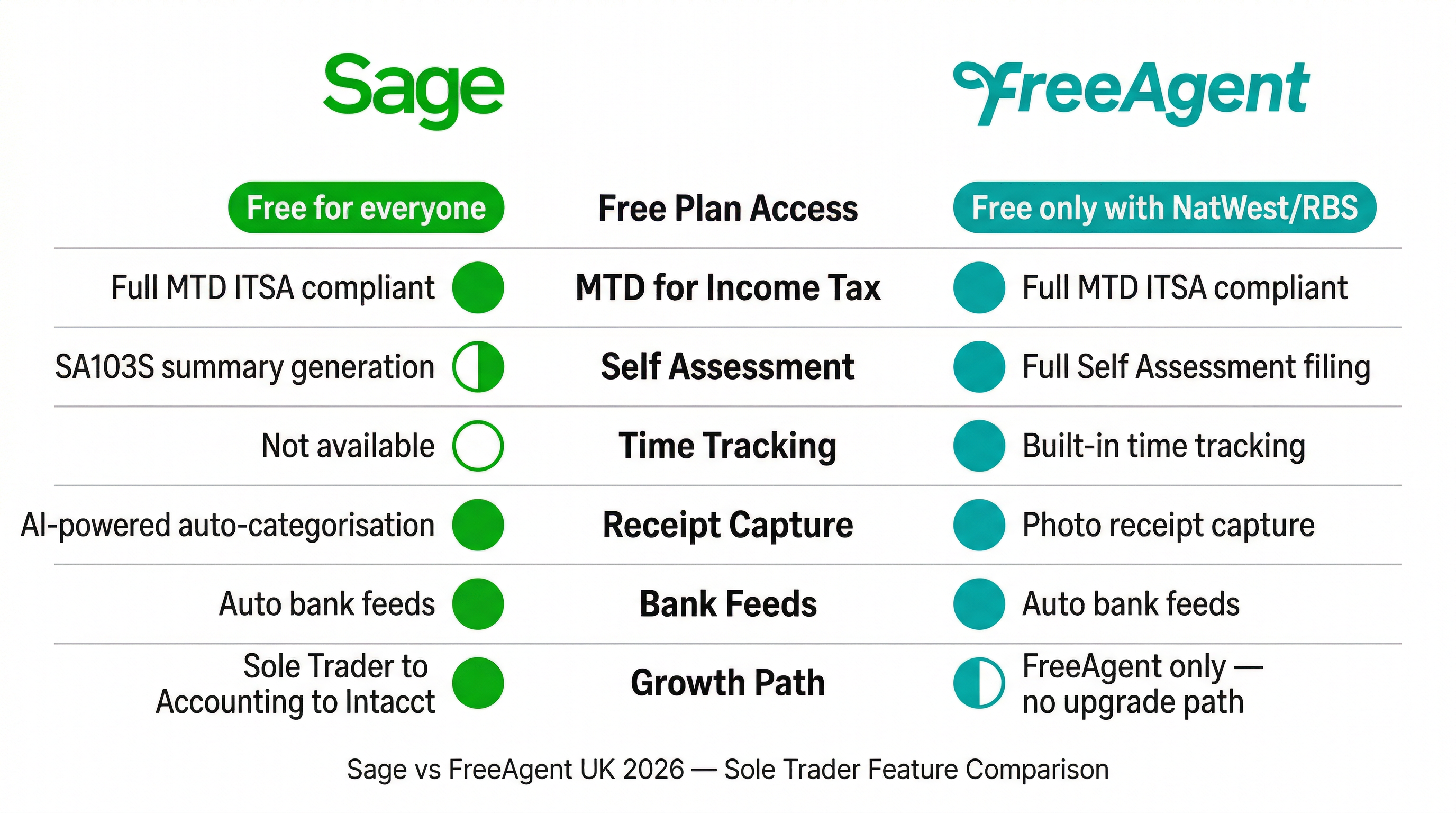
One of Sage's most compelling arguments for freelancers who expect their business to grow is the complete ecosystem upgrade path. Sage has built a consistent progression from the very bottom to the very top of business complexity:
- Sage Sole Trader (free) — basic invoicing and expense tracking for the simplest sole trader operations
- Sage Accounting Start (£15/month) — adds bank feeds, MTD VAT, and Sage Copilot AI
- Sage Accounting Standard (£30/month) — adds payroll for employees, CIS, multi-user access, and advanced reports
- Sage Accounting Plus (£59/month) — adds multi-currency, inventory, and unlimited users
- Sage Intacct (from £6,500/year) — enterprise financial management for multi-entity, complex reporting needs
Migrating within the Sage ecosystem as your business grows is significantly simpler than switching between platforms — your financial data, customer records, and historical accounts migrate within the same system. FreeAgent does not have an equivalent enterprise-level product; businesses that outgrow FreeAgent need to migrate to a different platform entirely, which involves data migration costs and learning curves.
For a freelancer who expects to employ staff, form a limited company, or grow into a multi-entity business, starting on Sage creates a clear runway. For a freelancer who expects to remain self-employed with straightforward needs, the growth path argument carries less weight.
Feature Comparison Table
| Feature | Sage Accounting Start (£15/mo) | FreeAgent Sole Trader (~£19/mo) |
|---|---|---|
| Invoicing | Yes — branded, automated reminders | Yes — branded, payment links |
| Bank feeds | Yes — Open Banking | Yes — Open Banking, NatWest direct |
| MTD for VAT | Yes — direct HMRC submission | Yes — direct HMRC submission |
| MTD ITSA | AI Agent (Copilot) | Integrated quarterly updates |
| Self Assessment (SA100) | Via accountant / separate tool | Direct HMRC submission built in |
| Time tracking | Not included | Integrated time tracking |
| Project tracking | Basic | Full project profitability tracking |
| Multi-currency | Not on Start plan | Included on sole trader plan |
| AI features | Sage Copilot — MTD Agent, forecasting | Limited AI features |
| Expense capture | AI receipt capture | Mobile receipt capture |
| Tax liability estimate | Via reports | Real-time running estimate |
| Free tier available | Yes (Sage Sole Trader — limited) | Yes (NatWest/RBS customers — full) |
| Growth path | Sage Accounting → Intacct | Ends at FreeAgent — must migrate to grow |
Who Should Choose FreeAgent?
- Freelancers and contractors banking with NatWest or RBS — the free full-featured access is an exceptional deal
- Hourly-rate freelancers who need integrated time tracking linked to invoices
- Sole traders who want to file Self Assessment directly from their accounting software without involving an accountant
- International freelancers who bill clients in multiple currencies at the starter price point
- Freelancers who want a purpose-built, freelancer-centric interface rather than a scaled-down small business product
- IT contractors and consultants managing multiple concurrent project engagements
Who Should Choose Sage?
- Sole traders who plan to hire employees and grow their business — Sage provides a complete growth path within one ecosystem
- Freelancers who value AI-powered automation, particularly Sage Copilot's MTD Agent
- Sole traders who do not bank with NatWest/RBS and are comparing standard pricing — Sage Start at £15/month is cheaper than FreeAgent
- Businesses that need UK phone support for urgent queries
- Freelancers planning to transition to limited company status, where Sage Accounting Standard provides a stronger foundation than FreeAgent
- Anyone already in the Sage ecosystem who wants to avoid migration costs
Our Verdict
FreeAgent Wins for Pure Freelancers — Especially NatWest/RBS Customers
For self-employed professionals who plan to stay freelance, FreeAgent's purpose-built feature set is the better fit. The integrated time tracking, direct Self Assessment submission, project profitability tracking, and multi-currency support at the standard plan price reflect deep expertise in the freelancer market. For NatWest and RBS customers, the free access makes FreeAgent an almost automatic choice.
- Free for NatWest/RBS customers — extraordinary value
- Direct Self Assessment filing — no accountant needed
- Native time tracking for hourly billing
- Real-time tax liability estimate throughout the year
Sage Wins for Growth-Minded Sole Traders
If you are a sole trader today but expect to employ staff, scale your business, or eventually move to a limited company structure, Sage's growth path is compelling. The ability to migrate from Sole Trader to Accounting to Intacct within a single ecosystem, without the friction and cost of platform migration, provides a meaningful long-term advantage. Sage Copilot's AI features are also more advanced than FreeAgent's equivalent.
- Complete growth path from free to enterprise
- Sage Copilot AI — more advanced MTD automation
- UK phone support on all plans
- Cheaper than FreeAgent at standard pricing (£15 vs £19)
Overall: Start with FreeAgent If You Bank with NatWest; Choose Sage for Growth
This is one of those genuinely context-dependent decisions. If you are a freelancer with a NatWest or RBS business account and no immediate plans to employ staff, FreeAgent is the obvious rational choice — free, purpose-built, and feature-rich for your exact needs. If you anticipate growth, value AI automation, or bank elsewhere, Sage Accounting Start at £15/month offers excellent value with a clear path to more powerful tools as your business develops.