Sage Sole Trader Review: Is the Free Plan Actually Good Enough for UK Self-Employed?
A comprehensive review of Sage for Sole Traders — comparing the free and paid plans, MTD for Income Tax compliance, AI-powered receipt capture, bank feed automation, quarterly HMRC submissions, SA103S summaries, and who should use each plan.
Ledger Businesses is reader-supported. When you buy through links on our site, we may earn an affiliate commission at no extra cost to you. Learn more.
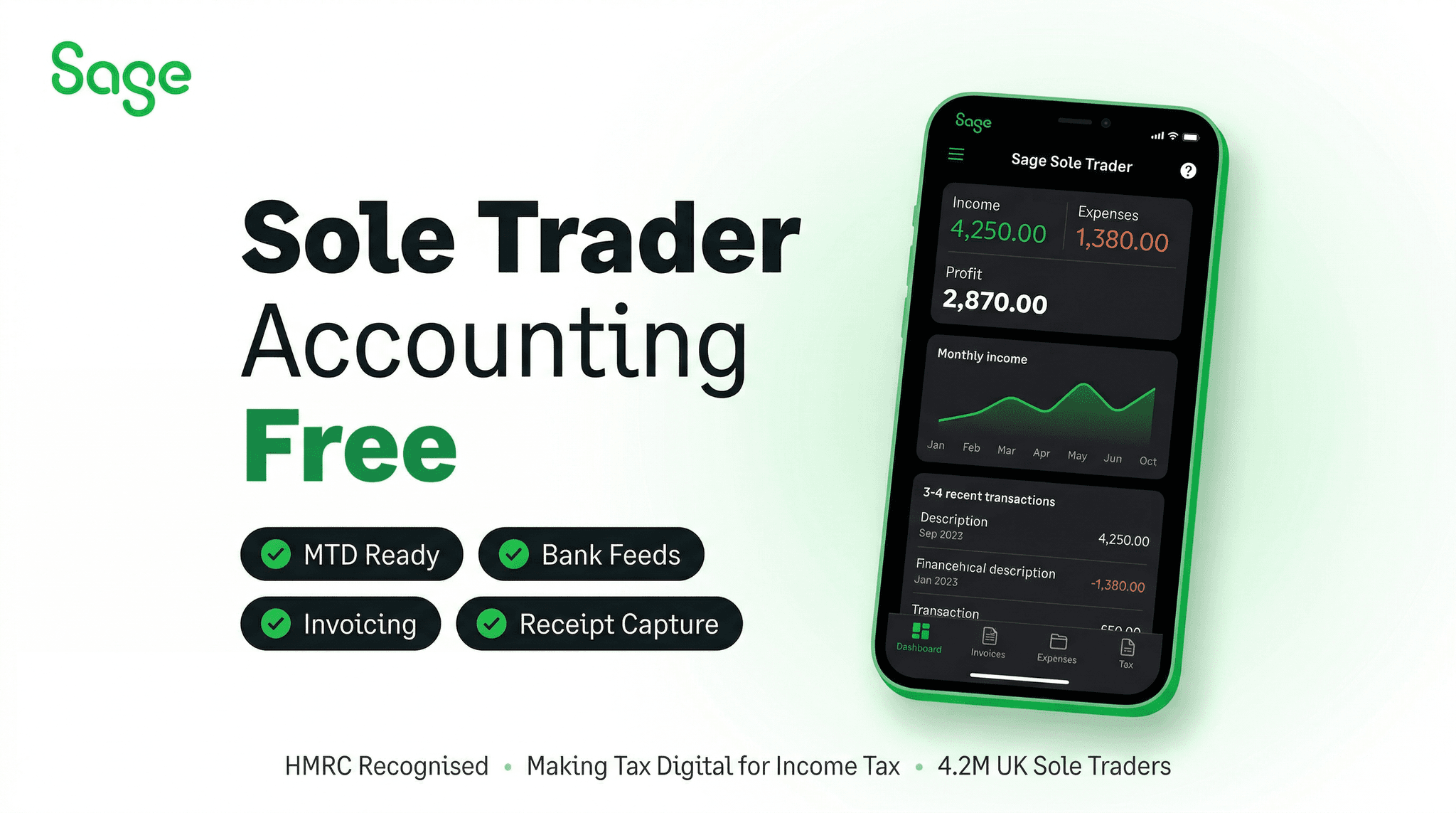
For the UK's five million-plus self-employed individuals, accounting software has historically meant a spreadsheet, a shoebox of receipts, and an annual scramble to pull everything together for a Self Assessment return. That approach is about to become legally insufficient. From April 2026, Making Tax Digital for Income Tax Self Assessment (MTD ITSA) requires eligible sole traders and landlords to maintain digital records and submit quarterly updates to HMRC — a fundamental change to the way the self-employed interact with the tax system.
Sage Sole Trader is Sage's dedicated offering for this market. It is a streamlined accounting platform — simpler than Sage Accounting, priced differently, and designed specifically around the workflow of the UK's self-employed. Crucially, it offers a genuinely functional free plan, making it one of the few HMRC-approved MTD ITSA platforms with a no-cost entry point.
This review compares the free and paid plans in detail, examines every key feature, and provides a clear framework for deciding which option suits your situation — or whether a different approach might serve you better.
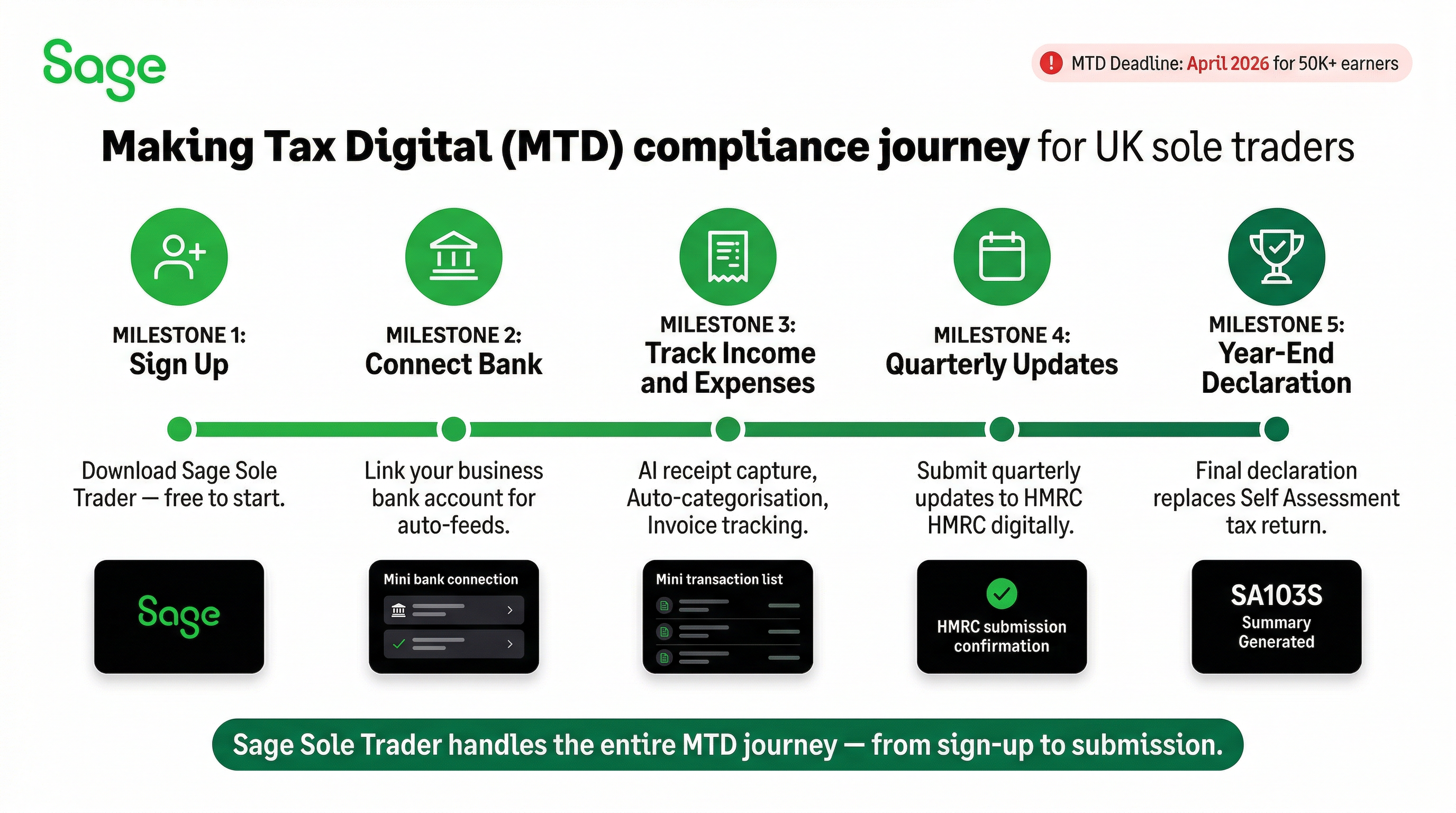
From April 2026, sole traders and landlords with qualifying income (initially those with income above £50,000, extending to lower thresholds in subsequent years) must use MTD-approved software to keep digital records and submit quarterly updates to HMRC. A spreadsheet or paper records will not comply. Sage Sole Trader — including the free plan — is HMRC-approved for MTD ITSA.
What Is Sage Sole Trader?
Sage Sole Trader is a purpose-built accounting platform for UK sole traders and self-employed individuals. It differs from Sage Accounting (which covers limited companies, VAT-registered businesses and those with employees) by focusing on the specific requirements of the self-employed: tracking income and expenses, capturing receipts, connecting bank accounts, generating SA103S summaries for self-employment income, and submitting the quarterly digital updates required under MTD ITSA.
The platform is available as a free plan with core functionality and a paid plan that adds automation, unlimited invoicing and enhanced features. It runs in a web browser and through mobile apps for iOS and Android, with the app being particularly central to the daily workflow — photographing receipts on the go is one of the platform's primary use patterns.
Sage Sole Trader is not designed for VAT-registered sole traders, businesses with employees, or those operating as limited companies. For those profiles, Sage Accounting Start is the appropriate entry point.
MTD for Income Tax — The April 2026 Deadline
Making Tax Digital for Income Tax Self Assessment is the most significant change to UK tax administration for sole traders in a generation. It is worth understanding in detail because it is the primary driver for why self-employed individuals need MTD-compliant software by April 2026.
Who Is Affected
- From April 2026 — Sole traders and landlords with qualifying income above £50,000 per year must comply
- From April 2027 — The threshold drops to £30,000, bringing a larger proportion of the self-employed into scope
- From April 2028 — Further extension to lower income thresholds (details subject to HMRC confirmation)
What MTD ITSA Requires
- Digital record keeping — All income and expense transactions must be recorded in MTD-approved software, not spreadsheets or paper records
- Quarterly updates — Four quarterly digital submissions to HMRC per tax year, replacing the previous annual Self Assessment return as the primary reporting mechanism
- End of Period Statement (EOPS) — An annual declaration submitted after the end of the tax year confirming the quarterly submissions are accurate
- Final Declaration — Replacing the SA100, this annual submission consolidates all income sources and finalises the tax position
The quarterly submission deadlines for the standard 6 April–5 April tax year are:
| Quarter | Period Covered | Submission Deadline |
|---|---|---|
| Quarter 1 | 6 April – 5 July | 5 August |
| Quarter 2 | 6 July – 5 October | 5 November |
| Quarter 3 | 6 October – 5 January | 5 February |
| Quarter 4 | 6 January – 5 April | 5 May |
Sage Sole Trader handles all of this automatically — generating quarterly summaries from your recorded transactions and submitting them directly to HMRC through the MTD API. This is available on both the free and paid plans, which is a notable differentiator: many competitors only offer MTD ITSA compliance on paid tiers.
Sage Sole Trader Free Plan — What You Get at No Cost
The free plan is Sage's entry point for sole traders who want to get MTD-compliant without committing to a monthly subscription. It is not a limited trial — it is a permanent free tier with a real, usable feature set.
Free Plan Features
- Digital record keeping — Record income and expenses in a digital format that meets MTD requirements
- Income and expense categorisation — Categorise transactions against the HMRC self-employment categories used in the SA103S (the supplementary Self Assessment page for self-employment income)
- Limited invoicing — Create and send a limited number of invoices per month. The free plan does not include unlimited invoicing — this is one of the key functional limitations that distinguishes it from the paid plan
- Basic receipt capture — Photograph receipts using the mobile app and attach them to expense records. The AI-powered automatic categorisation of receipts is more fully developed on the paid plan
- MTD ITSA quarterly submissions — Generate and submit quarterly digital updates to HMRC directly from the platform — a remarkable inclusion on the free tier
- SA103S summary — Generate a summary of self-employment income and expenses in the format required for Self Assessment, usable by an accountant or for the Final Declaration
- Basic profit and loss view — A simple summary of income versus expenses for any selected period
- Mobile app access — iOS and Android apps for recording on the go
Free Plan Limitations
- Limited invoices per month — You cannot send unlimited invoices on the free plan; once the monthly limit is reached, you must upgrade to the paid plan or wait until the following month
- No bank feed automation — Bank feeds (automatic import of bank transactions) are a paid plan feature. On the free plan, transactions must be entered manually or imported via CSV file
- Basic AI categorisation — The AI-powered receipt categorisation is more limited on the free tier; the paid plan has more sophisticated automatic categorisation that learns from your patterns
- No cash flow forecasting — Forward-looking cash position analysis is unavailable on the free plan
- Limited reporting — Reporting on the free plan covers the basics; more detailed expense breakdowns and period comparisons are paid features
Sage Sole Trader Paid Plan — Features and Pricing
The paid plan removes the limitations of the free tier and adds significant automation and feature depth. It is priced competitively within the UK self-employed accounting market.
Paid Plan Features
- Everything in the free plan
- Unlimited invoicing — No cap on the number of invoices you can create and send per month, suitable for freelancers with many clients or high-volume client billing
- Automated bank feeds — Direct connection to UK bank accounts (Barclays, HSBC, Lloyds, Monzo, NatWest, Revolut, Santander, Starling and others), with transactions automatically imported daily. This eliminates manual transaction entry and is one of the most significant time-saving features for the self-employed
- AI-powered transaction categorisation — The paid plan's AI analyses each imported bank transaction and automatically suggests or applies the correct expense category based on the payee name, description and your historical categorisation patterns. Over time, the system handles an increasing proportion of transactions with no manual input
- AI receipt capture with OCR — Full AI-powered receipt processing: photograph a receipt, and the platform's OCR (optical character recognition) technology reads the merchant, date and amount, creates an expense record and suggests the appropriate category. On the paid plan, this process requires minimal manual correction
- Cash flow view — Forward-looking view of expected income and outgoings based on recurring transactions and outstanding invoices
- Invoice payment tracking — Track which invoices are outstanding, partially paid and overdue, with automatic payment reminder functionality
- Payment acceptance — Allow clients to pay invoices online by card or bank transfer via Stripe integration, typically reducing average time to payment significantly
- Enhanced reporting — More granular income and expense reports by category and time period, useful for year-end tax preparation
- MTD ITSA compliance — Full quarterly submissions, EOPS and Final Declaration support
- SA103S summaries — Generate complete SA103S summaries that either feed into your Final Declaration or can be shared with an accountant
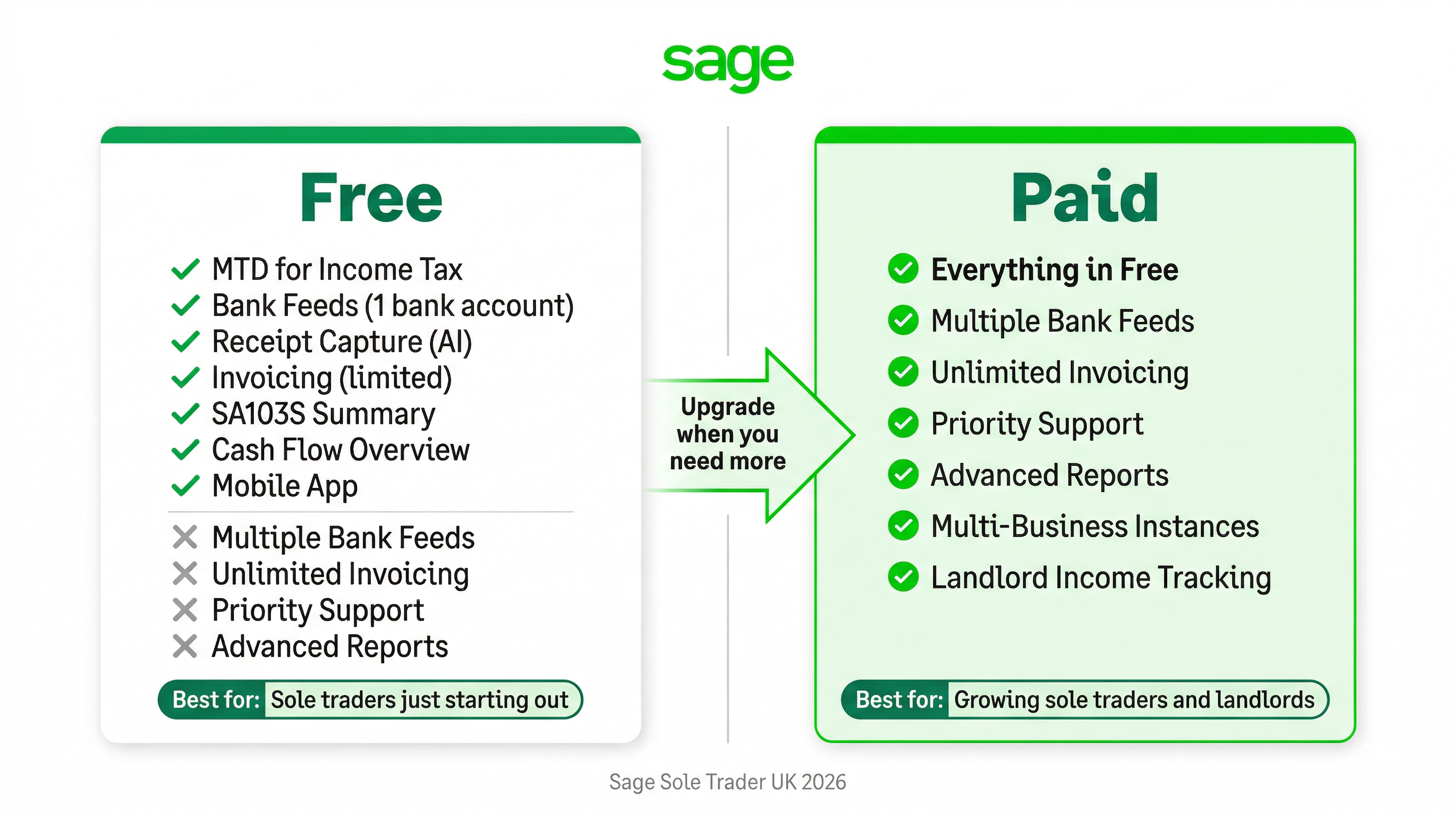
Free vs Paid Plan — Side-by-Side Comparison
| Feature | Free Plan | Paid Plan |
|---|---|---|
| Monthly cost | £0 | Paid (check current pricing) |
| Digital record keeping | ✓ | ✓ |
| MTD ITSA quarterly submissions | ✓ | ✓ |
| SA103S summaries | ✓ | ✓ |
| Invoicing | Limited per month | Unlimited |
| Bank feed automation | — (manual entry) | ✓ Automated |
| AI receipt capture (OCR) | Basic | Full AI + OCR |
| AI transaction categorisation | Basic | Full AI learning |
| Cash flow view | — | ✓ |
| Invoice payment tracking | Basic | Full + reminders |
| Online payment acceptance | — | ✓ (via Stripe) |
| Enhanced reports | Basic P&L only | Full reporting suite |
| Mobile app | ✓ | ✓ |
Bank Feed Automation — A Closer Look
Bank feed automation is arguably the single most transformative feature for the self-employed, and it is exclusive to the paid plan of Sage Sole Trader. Here is why it matters so significantly.
Without bank feeds, recording business transactions requires one of three approaches: manually typing each transaction into the accounting software; exporting a CSV from online banking and importing it; or waiting until you have accumulated a batch and entering them all at once. All three approaches are time-consuming, error-prone and create the risk of falling behind on record keeping — which creates exactly the compliance risk that MTD is designed to eliminate.
With bank feeds, every transaction that flows through your connected business bank account appears in Sage Sole Trader automatically, typically within one business day. The AI then suggests a category — travel, equipment, professional fees, subcontractor costs, and so on — which you confirm or adjust. For sole traders with consistent spending patterns (the same suppliers, the same types of expenses), the AI's accuracy improves quickly, and the weekly bookkeeping task reduces from an hour or more to a few minutes of confirming categorisations.
Supported banks include most major UK high street providers and challenger banks, including Barclays, HSBC, Lloyds, Monzo, NatWest, Revolut, Santander and Starling. Business accounts and personal accounts used for business purposes can both be connected.
AI-Powered Receipt Capture and OCR
On the paid plan, Sage Sole Trader's receipt capture uses Optical Character Recognition (OCR) combined with machine learning to extract information from photographed receipts. The process works as follows:
- Open the Sage Sole Trader mobile app and take a photograph of a receipt
- The AI reads the merchant name, total amount and date from the image
- An expense record is automatically created with the extracted data pre-populated
- The AI suggests an expense category based on the merchant type and your historical categorisation patterns
- You review and confirm — or adjust if necessary — typically taking seconds per receipt
- The receipt image is stored securely and linked to the expense record for audit purposes
This workflow matters particularly for sole traders who accumulate paper receipts — parking tickets, coffee with a client, stationery, fuel, tools — throughout the month. Rather than filing receipts for a monthly data entry session, each receipt is processed in real time at the point of purchase. HMRC requires receipts to be retained for at least five years and ten months following the tax year; storing them digitally within Sage Sole Trader satisfies this requirement.
Quarterly HMRC Submissions in Practice
Understanding what the quarterly MTD ITSA submission actually involves demystifies the process for sole traders who are unfamiliar with the new requirements.
What Each Quarterly Submission Contains
A quarterly update is not a tax return — it is a summary of your income and expenses for the quarter, categorised into the HMRC-specified categories for the SA103S (self-employment supplementary pages). It does not calculate a tax liability for the quarter, and it does not require payment. It is essentially a digital update that tells HMRC what your self-employment figures look like so far in the tax year.
Sage Sole Trader generates this quarterly summary automatically from the transactions you have categorised in the platform. The process is:
- Ensure all transactions for the quarter are recorded and categorised (bank feeds and AI categorisation handle most of this automatically on the paid plan)
- Review the quarterly summary Sage generates — income by type, expenses by category, aligned to SA103S categories
- Submit to HMRC directly from Sage with a single confirmation step
- Receive HMRC's acknowledgement of receipt within the platform
The whole process should take 15–30 minutes for a typical sole trader on the paid plan, compared with hours of preparation under the old annual Self Assessment model.
End of Period Statement (EOPS) and Final Declaration
After the fourth quarterly submission, you complete an End of Period Statement — a declaration that the quarterly submissions are accurate and complete for the business. The Final Declaration then consolidates all income sources (self-employment, employment, dividends, rental income) and computes the final tax liability for the year, replacing the SA100 tax return. Both are supported within Sage Sole Trader on both the free and paid plans.
SA103S Summaries
The SA103S is the supplementary Self Assessment page for self-employment income. Under the old system, completing this page was the crux of the annual Self Assessment exercise. Under MTD ITSA, the equivalent data is submitted quarterly with the four quarterly updates, and the Final Declaration summarises it.
Sage Sole Trader generates SA103S-format summaries from your recorded transactions on both free and paid plans. This is useful whether you handle your own tax affairs or work with an accountant. An accountant can be given access to your Sage Sole Trader data, download the SA103S summary and use it to prepare the Final Declaration, just as they would previously have used bank statements and receipts to prepare the SA100.
Sage Sole Trader vs Competitors for MTD ITSA
| Platform | Free Plan? | MTD ITSA Approved? | Bank Feeds (Free) | Quarterly Submissions (Free) | AI Categorisation |
|---|---|---|---|---|---|
| Sage Sole Trader | ✓ Yes | ✓ Approved | — (paid only) | ✓ | ✓ (fuller on paid) |
| QuickBooks Sole Trader | — | ✓ Approved | — (paid only) | ✓ | ✓ |
| FreeAgent | — (free for NatWest/RBS) | ✓ Approved | ✓ (with bank) | ✓ | ✓ |
| Wave | ✓ Yes | — (not approved) | Limited | — | Basic |
| KashFlow | — | — (not approved) | — | — | Basic |
| Zoho Books Free | ✓ Yes | — (in development) | Limited | — | Basic |
The competitive picture is clear: Sage Sole Trader is one of the very few platforms with both a free plan and HMRC approval for MTD ITSA. Wave is free but has no MTD ITSA approval (critical from April 2026) and has a poor Trustpilot rating of 1.6/5. Zoho Books has a free tier but MTD ITSA support is still described as in development, meaning it cannot be relied upon for compliance. KashFlow, with a Trustpilot rating of 1.4/5, also lacks MTD ITSA approval.
FreeAgent is effectively free for NatWest and RBS business banking customers — if you bank with NatWest or RBS, that is a compelling alternative to consider. For those who do not, Sage Sole Trader's free plan with full MTD ITSA capability is the most complete no-cost option for UK sole traders.
Who Should Use the Free Plan?
The Sage Sole Trader free plan is appropriate for:
- Sole traders with very few transactions — If you invoice a small number of regular clients and have limited and predictable expenses, the free plan's manual transaction entry is manageable without bank feeds
- Self-employed individuals not yet approaching the MTD ITSA threshold — If your self-employment income is well below £50,000, you are not legally required to comply with MTD ITSA until the thresholds extend to lower income levels. The free plan lets you prepare for compliance without cost
- Those who send fewer invoices than the free plan limit — If you send a handful of invoices each month, the invoice limit on the free plan will not constrain you
- Sole traders who will handle their own categorisation manually — If you are comfortable spending 30–60 minutes per month manually entering and categorising transactions, bank feed automation is less critical
- Those testing the platform before committing — The free plan serves as an unlimited-duration trial, allowing you to evaluate the platform's suitability before upgrading
Who Should Use the Paid Plan?
The paid plan is the right choice for:
- Active freelancers who invoice regularly — Anyone sending more than a handful of invoices per month will quickly hit the free plan's limit; unlimited invoicing is essential for active freelance businesses
- Sole traders with more than 30–40 transactions per month — Once transaction volume exceeds what is comfortable to enter manually, bank feed automation pays for itself in time saved. Most active sole traders exceed this threshold quickly
- Those approaching or exceeding the £50,000 MTD ITSA threshold — The combination of bank feeds, AI categorisation and seamless quarterly submissions makes compliance significantly easier when income is high enough to mandate MTD ITSA
- Sole traders with irregular or receipted expenses — Anyone who accumulates receipts for business purchases will find the full AI OCR receipt capture invaluable versus the basic version on the free plan
- Businesses that want to offer clients online payment on invoices — The Stripe integration for online invoice payment is a paid feature that can meaningfully improve cash flow through faster payment
- Self-employed individuals who want a complete, low-maintenance compliance solution — Bank feeds + AI categorisation + automated quarterly submissions creates a near-zero-maintenance MTD compliance setup
Choose the Free Plan If...
You have simple finances, send only a few invoices per month, have self-employment income well below £50,000, or want to evaluate Sage Sole Trader without financial commitment. The free plan provides genuine MTD ITSA compliance capability at no cost — a significant advantage over alternatives that lack HMRC approval.
- Fewer than 5–10 invoices per month
- Comfortable entering transactions manually or by CSV import
- Self-employment income below the current MTD ITSA threshold
- Want to get MTD-compliant without any monthly subscription
- Want to evaluate the platform properly before upgrading
Choose the Paid Plan If...
You run an active freelance or self-employed business, send regular invoices, have a meaningful volume of business transactions, want the time-saving benefits of automated bank feeds and AI categorisation, or are approaching the income threshold where MTD ITSA compliance will be mandatory from April 2026.
- More than 5–10 invoices per month (need unlimited invoicing)
- More than 30–40 transactions per month (bank feeds save significant time)
- Self-employment income above £40,000 (approaching mandatory MTD ITSA)
- Regularly photographing and filing receipts for business expenses
- Want clients to be able to pay invoices online, reducing debtor days
- Want a hands-off, near-automated compliance workflow
Final Verdict
Sage Sole Trader is one of the most thoughtfully designed accounting solutions for the UK self-employed in 2026. The dual free/paid structure means it is accessible at every budget level — and critically, both plans include genuine HMRC-approved MTD ITSA compliance, which competitors often restrict to paid tiers or have not yet achieved at all.
The free plan is not a crippled trial. It genuinely works for sole traders with straightforward finances who are willing to manage their own data entry. The invoice limit is the primary constraint, and for many sole traders with a small number of regular clients, that limit is not a practical barrier.
The paid plan is where Sage Sole Trader becomes truly compelling — particularly the bank feed automation combined with AI categorisation. For any active sole trader who values their time, the elimination of manual transaction entry alone is worth the monthly cost. Add unlimited invoicing, full AI receipt capture, online payment acceptance and enhanced reporting, and the paid plan represents a comprehensive, low-effort compliance solution for the self-employed.
With the April 2026 MTD ITSA deadline approaching for higher-income sole traders, and lower thresholds following in subsequent years, there is a strong case for getting set up now. Using the free plan during 2025 and early 2026 — and upgrading to paid as transaction volume warrants — is a prudent strategy that costs nothing to begin.