Making Tax Digital ITSA 2026: Deadlines, Rules and How to Get Compliant Fast
A comprehensive guide to Making Tax Digital for Income Tax Self Assessment, which goes live in April 2026 for sole traders and landlords earning £50,000+. Covers the quarterly submission requirements (four updates plus a final declaration), what digital records you need to keep, HMRC-compatible software options, the points-based penalty system for late submissions, and how the £30,000 threshold drops in April 2027. Explains how Sage Sole Trader (free) and Sage Accounting handle MTD compliance, including Sage's MTD AI Agent — the UK's first agentic compliance tool.
Ledger Businesses is reader-supported. When you buy through links on our site, we may earn an affiliate commission at no extra cost to you. Learn more.
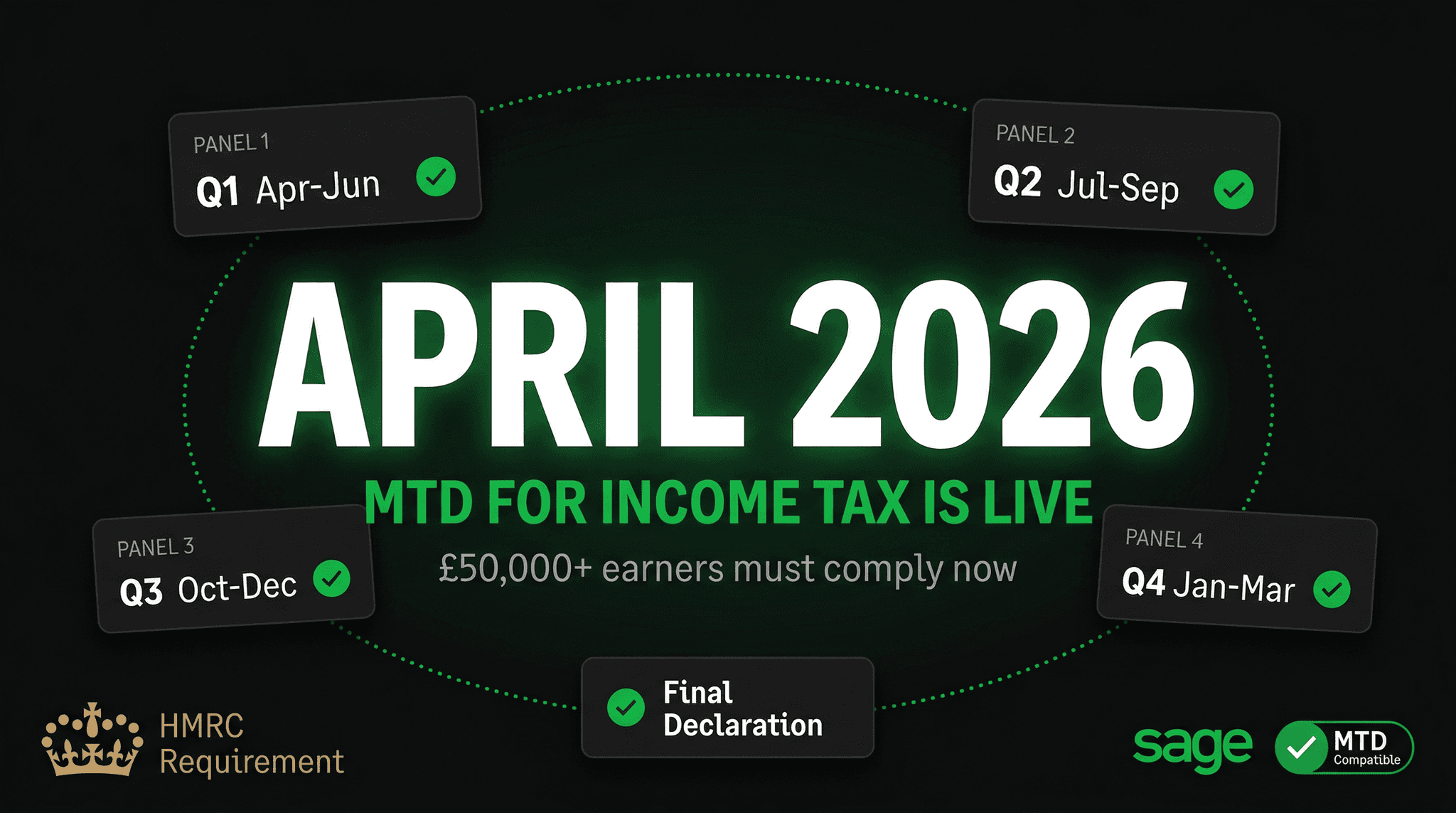
Making Tax Digital for Income Tax Self-Assessment — known as MTD for ITSA or simply MTD for Income Tax — is the most significant change to UK personal tax administration since the introduction of Self-Assessment in the 1990s. Instead of filing one annual tax return by January 31st, certain taxpayers will need to submit quarterly digital records to HMRC throughout the year, using HMRC-compatible software.
The April 2026 go-live date is firm. After years of delays and consultations, HMRC is rolling out MTD for ITSA in phases, and the first wave — affecting individuals with combined self-employment and property income over £50,000 — arrives this year. If you are in scope, you need to be using compatible software, keeping digital records, and making quarterly submissions by April 2026. The time to prepare is now, not in the months before the deadline.
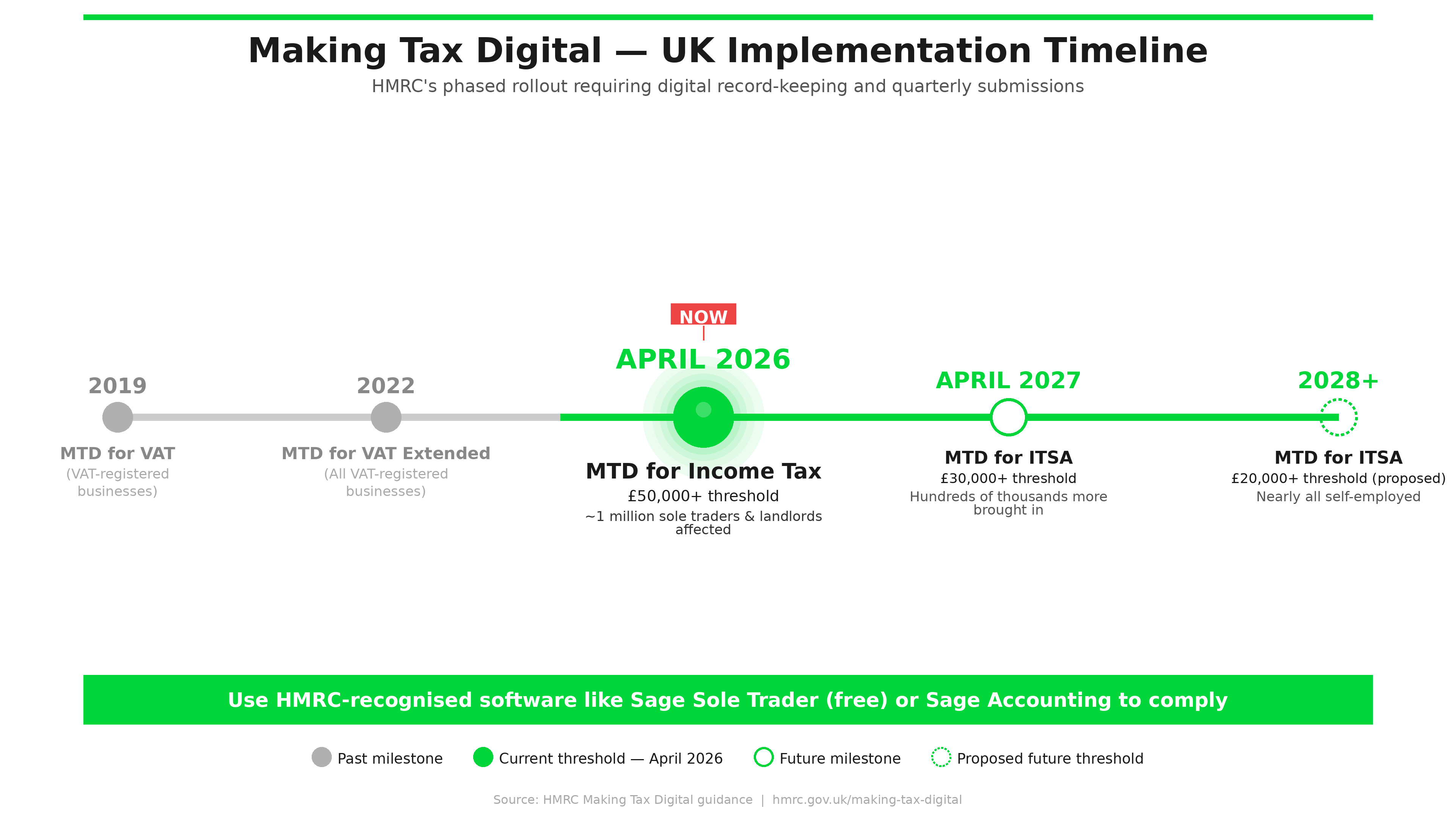
April 2026: Mandated for £50,000+ combined income from self-employment and/or property. April 2027: Extended to £30,000+ income. You must use HMRC-approved software to keep digital records and submit 5 times per year (4 quarterly updates + 1 final declaration). Penalties apply for late or non-compliant submissions.
Who Is Affected and When?
HMRC is rolling out MTD for ITSA in income-based phases rather than all at once.
| Phase | Start Date | Who Is Affected |
|---|---|---|
| Phase 1 | April 2026 | Self-employed individuals and/or landlords with combined qualifying income above £50,000 |
| Phase 2 | April 2027 | Self-employed individuals and/or landlords with combined qualifying income above £30,000 |
| Phase 3 | TBC | Those with income between £20,000 and £30,000 (date not yet confirmed by HMRC) |
| Partnerships | TBC | Date not yet confirmed — likely post-2027 |
The income threshold is based on combined qualifying income from self-employment and UK property — not total income including employment income. So a freelance designer with £55,000 in self-employment income is in scope from April 2026. A PAYE employee with a side income of £45,000 from a rental property is also in scope from April 2026. An employed individual who also has self-employment income of £25,000 is not in scope until April 2027 at the earliest.
Certain groups are currently exempt from MTD for ITSA requirements, including those with income solely from partnerships (until a future date), those with certain trust arrangements, and those with legitimate exemptions granted by HMRC (such as digital exclusion on grounds of age or disability). If you believe you may qualify for an exemption, contact HMRC or your accountant to apply well before the relevant start date.
What Does MTD for Income Tax Actually Require?
The core requirement of MTD for ITSA is that you keep digital records of your income and expenditure in HMRC-compatible software, and use that software to submit quarterly updates to HMRC throughout the tax year, followed by a final declaration at year end.
The Five Submissions Per Year
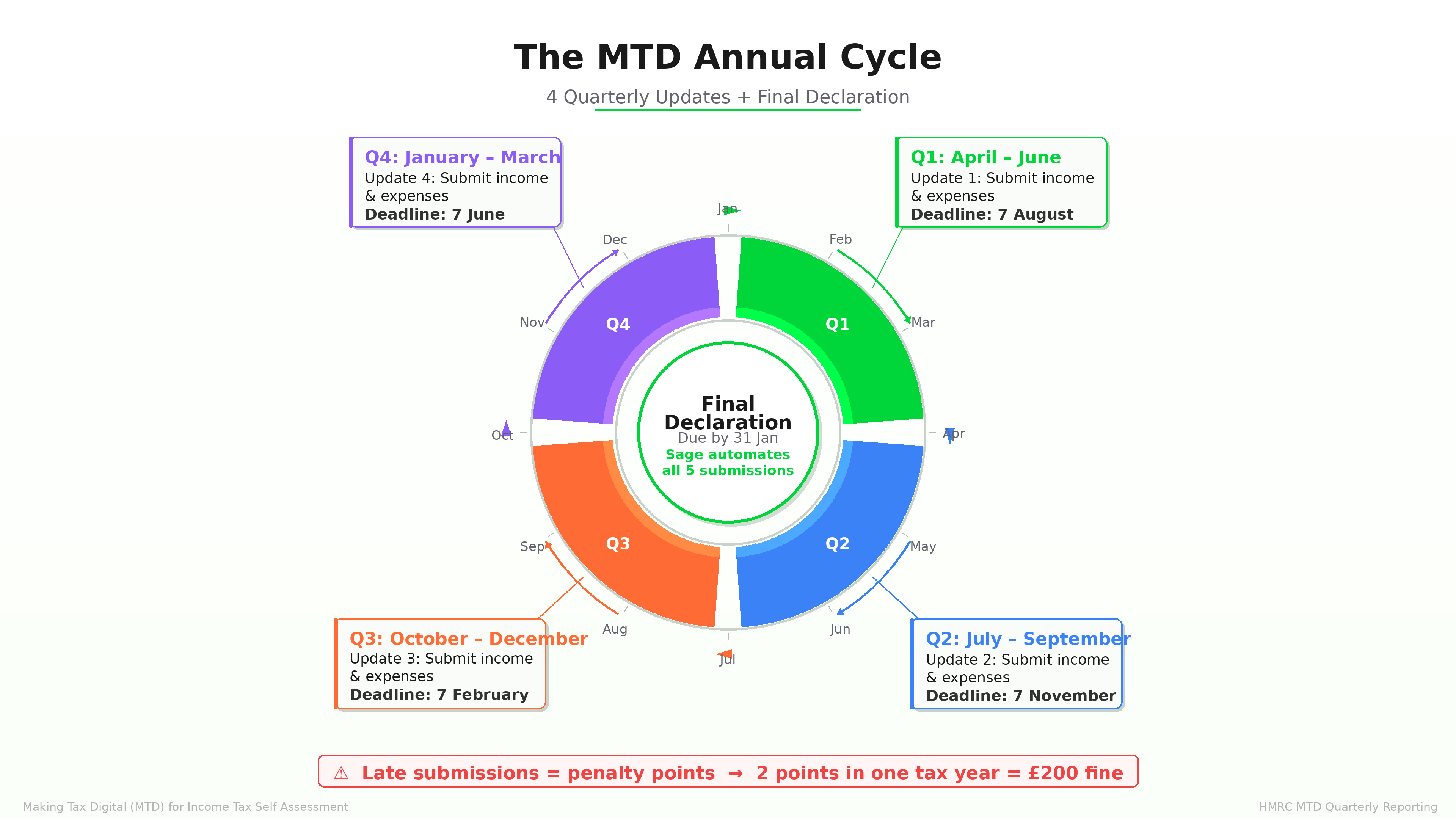
MTD for ITSA replaces the single annual Self-Assessment return with five submissions per year:
| Submission | Period Covered | Due Date |
|---|---|---|
| Quarter 1 Update | 6 April – 5 July | 5 August |
| Quarter 2 Update | 6 July – 5 October | 5 November |
| Quarter 3 Update | 6 October – 5 January | 5 February |
| Quarter 4 Update | 6 January – 5 April | 5 May |
| Final Declaration | Full tax year | 31 January (as now) |
The quarterly updates are cumulative income and expense summaries for that quarter — they are not detailed transaction-by-transaction reports sent to HMRC. Your software collects your records and aggregates them for submission. The final declaration (replacing the current Self-Assessment tax return) is where you confirm the year's totals, add any additional income sources not captured in the quarterly updates, claim reliefs and allowances, and finalise your tax liability.
Quarterly updates are income and expense summaries — not full accounts or detailed ledgers sent to HMRC. You keep the detailed records in your software; you submit the aggregated totals. Think of it as quarterly check-ins rather than quarterly tax returns.
What Records Must Be Kept Digitally?
HMRC requires that specified records are kept digitally in compatible software. For self-employed individuals, the required digital records include:
- Business income: all sales and income receipts, including amounts, dates, and customer or description details
- Business expenses: all purchases and expenditure with amounts, dates, and expense category information
- Business type and nature of each transaction sufficient for categorisation
- Adjustments: any disallowable expenses, private use adjustments, or capital allowance claims
For landlords, the required digital records include:
- Rental income received from each property or portfolio
- Allowable property expenses: repairs and maintenance, letting agent fees, insurance, mortgage interest (subject to restrictions), and other deductible costs
- Details sufficient to identify each property or, where a property portfolio election is made, the portfolio totals
The key point is that records must be kept in HMRC-compatible software — not in a spreadsheet (unless using a bridging software solution), not in a shoebox, and not in a basic accounting tool that lacks HMRC API connectivity. The software must be capable of submitting the quarterly updates directly to HMRC's systems.
What Records Do NOT Need to Be Digital?
HMRC has clarified that the digital records requirement applies to your income and expense information — not to every supporting document. Paper receipts, bank statements, and invoices do not themselves need to be digital, provided the transaction information they contain is entered into your digital records. However, keeping digital copies of supporting documents (photographed receipts, downloaded bank statements, scanned invoices) is strongly recommended for practical record-keeping and in case of HMRC enquiry.
MTD-Compatible Software: The Critical Requirement
You cannot comply with MTD for ITSA using paper records or a spreadsheet alone. You need software that is approved by HMRC and can submit quarterly updates and the final declaration directly through HMRC's MTD APIs. HMRC maintains a list of approved software providers on its website.
What to look for in compatible software:
- HMRC recognition as MTD for ITSA compatible software (confirmed, not just "in development")
- Ability to categorise income and expenses in the correct HMRC categories
- Quarterly update submission directly to HMRC (no manual CSV export and upload)
- Final declaration capability from within the software
- Bank feed integration to reduce manual data entry
- Ability to handle multiple income sources if relevant (both self-employment and property income)
How Sage Helps with MTD for Income Tax
Sage offers multiple products that support MTD for ITSA compliance, suited to different types of taxpayers and their income levels.
Sage Sole Trader (Free Plan)
Sage Sole Trader is specifically designed for self-employed individuals and is the most accessible MTD-compatible option Sage offers. The free plan includes digital income and expense tracking, categorisation, and MTD for ITSA quarterly submission capability. For sole traders with relatively straightforward businesses — a freelancer, a sole-trader tradesperson, a small online seller — the free plan covers the essential MTD requirements without any software cost.
The paid plan for Sage Sole Trader adds bank feed automation, receipt capture via mobile camera, and more detailed reporting. For most sole traders who are in scope for MTD for ITSA, even the free plan will satisfy the compliance requirement.
Sage Accounting
For self-employed individuals or landlords with more complex finances — higher turnover, multiple income streams, employees, VAT registration — Sage Accounting (Start, Standard, or Plus) provides full MTD for ITSA compatibility alongside complete bookkeeping functionality. Sage Accounting already handles MTD for VAT, so MTD for ITSA is an extension of an established compliance workflow rather than a new burden.
Key Sage Accounting features that help with MTD for ITSA preparation:
- Bank feed automation from major UK banks — transactions import automatically and are categorised using AI
- Receipt capture — photograph paper receipts with the mobile app and Sage's AI categorises and codes them
- Quarterly update submission — submit directly to HMRC from within the software with a few clicks
- Year-round cash flow visibility — see your tax position throughout the year, not just at January deadline time
- Copilot AI anomaly detection — flags unusual transactions or missing categorisation before submission
Sage's MTD AI Agent
Sage has developed what it describes as the UK's first agentic compliance tool for MTD — an AI agent that can autonomously prepare quarterly submissions from your digital records, identify potential errors before submission, and guide users through the process step by step. The MTD AI Agent is available within Sage Accounting and represents a significant reduction in the administrative burden of quarterly submissions for non-accountant users. Rather than manually reviewing each transaction category and constructing a submission, the AI agent can prepare a draft submission for your review and one-click approval.
Penalties for Non-Compliance
HMRC's penalty regime for MTD for ITSA uses a points-based system, different from the current Self-Assessment fixed penalties.
| Penalty Trigger | Points Awarded | Financial Penalty |
|---|---|---|
| Late quarterly update | 1 point per missed submission | £200 when threshold reached |
| Penalty point threshold reached (4 quarterly submissions/year) | Threshold: 4 points | £200 financial penalty |
| Late final declaration | Points system applies | £200 + additional penalties |
| Late payment of tax | Separate system | Interest + surcharges |
| Failure to keep digital records | N/A | Up to £3,000 |
The points-based system is designed to penalise persistent non-compliance rather than one-off late submissions. If you accumulate 4 penalty points (one per missed quarterly submission over a full year) and then miss another submission, a £200 financial penalty is applied. Points are reset to zero after a period of full compliance. HMRC will communicate your points balance through your online account.
For late payment of tax due, HMRC's separate late payment interest and penalty regime applies — interest accrues from the payment due date, and additional percentage-based penalties apply for extended non-payment. These are unchanged from the current Self-Assessment system.
Step-by-Step Preparation Guide for MTD for ITSA
If you are in scope for April 2026, here is how to prepare systematically.
- Confirm whether you are in scope. Add up your self-employment income and/or property income for the previous tax year. If the combined total exceeds £50,000, you are in scope from April 2026. If you are unsure, check your previous Self-Assessment return or speak to your accountant.
- Choose MTD-compatible software. Select a software product that is confirmed as MTD for ITSA compatible by HMRC. Do not rely on a provider's promise that compatibility is "in development" — check the confirmed HMRC list. Sage Sole Trader (free) and Sage Accounting are both confirmed-compatible options.
- Sign up for MTD for ITSA with HMRC. You need to sign up through your HMRC online account or through your compatible software. You cannot simply continue with Self-Assessment — active sign-up to the MTD regime is required. Sign up at least one month before your mandation date to avoid complications.
- Set up digital record-keeping. If you currently use spreadsheets, a paper cash book, or no records at all, you must transition to digital record-keeping in your chosen software. Ideally, begin keeping digital records for an entire quarter before your mandation date so you are familiar with the process.
- Connect your bank feeds. Set up Open Banking connections in your software so that bank and credit card transactions import automatically. This eliminates the biggest single cause of record-keeping failure — forgetting to enter transactions manually.
- Categorise transactions correctly. Work through your transaction categories to ensure income and expenses are coded to the correct HMRC categories. Most software includes AI-assisted categorisation that learns from your corrections over time.
- Run a test quarter. Use your software in the months before your mandation date to practise the quarterly update process. Some software providers offer a sandbox environment; others will flag that you are submitting outside the live period. Familiarise yourself with the submission workflow before it becomes mandatory.
- Submit your first quarterly update by 5 August 2026 (for Quarter 1 covering 6 April – 5 July). This is your first mandatory submission under MTD for ITSA if you are in scope from April 2026.
Common Questions About MTD for Income Tax
Do I still need an accountant?
MTD for ITSA does not eliminate the need for professional tax advice — in many cases it makes accountant involvement more valuable, not less. More frequent submissions mean more opportunities for errors and more touchpoints where professional oversight adds value. That said, the quarterly updates themselves are relatively simple summaries, and individuals with straightforward income may manage them independently using software like Sage Sole Trader. The final declaration is where professional advice is typically most valuable.
Can I use a spreadsheet?
Plain spreadsheets are not MTD-compatible because they cannot submit directly to HMRC's APIs. However, you can use a spreadsheet in combination with approved "bridging software" — a tool that connects a spreadsheet to HMRC's MTD APIs and handles the actual submission. This is a compliant approach but adds complexity and cost compared to using a dedicated MTD-compatible accounting tool. For most people in scope for MTD, switching to dedicated software is simpler.
What if I have both self-employment and property income?
If you have both self-employment income and property income, you will typically need to submit quarterly updates for each income source separately, then consolidate them in the final declaration. Some software handles this within a single account; others require separate records. Check that your chosen software supports both income types before signing up.
What if my income fluctuates around the threshold?
If your qualifying income is close to the £50,000 or £30,000 threshold, HMRC will determine your mandation based on your income in the previous tax year. If you were above the threshold in 2024/25, you are mandated from April 2026. If your income subsequently falls below the threshold, HMRC will review your status and may allow you to exit MTD for ITSA — but you cannot self-certify, you must wait for HMRC confirmation.
Does MTD for Income Tax affect companies?
No. MTD for ITSA applies to individuals in Self-Assessment — sole traders and landlords. Limited companies are subject to Corporation Tax, which has its own separate MTD programme (MTD for Corporation Tax) with a separate and later timeline. Directors of limited companies who also have personal self-employment or property income may be affected in their personal capacity.
How to Choose the Right Sage Product for MTD Compliance
Sage Sole Trader (Free) — Best for Simple Sole Traders
If you are a sole trader with a single income stream, relatively few transactions, and no employees or VAT registration, Sage Sole Trader's free plan is the simplest and lowest-cost path to MTD for ITSA compliance. It covers all the mandatory requirements — digital records, quarterly submissions, final declaration — at no software cost.
- Free — no monthly cost
- MTD for ITSA compliant
- Simple, focused interface for sole traders
- Upgrade to paid plan for bank feeds and receipt capture
Sage Accounting Start (£15/mo) — Best for VAT-Registered Sole Traders
If you are VAT-registered as well as self-employed, Sage Accounting Start handles both MTD for VAT and MTD for ITSA within the same platform. Bank feeds, automated categorisation, and the MTD AI Agent are included. One subscription covers all your digital tax obligations.
- Handles MTD for VAT and MTD for ITSA together
- Bank feed automation included
- Sage Copilot AI for anomaly detection
- MTD AI Agent for guided quarterly submissions
Sage Accounting Standard (£30/mo) — Best for Self-Employed with Employees
If you are self-employed with staff — even one or two — Sage Accounting Standard bundles payroll for up to five employees with full MTD compliance. RTI filing, pension auto-enrolment, and payslip generation sit alongside your quarterly income tax submissions in a single system.
- MTD for ITSA and MTD for VAT compliance
- Payroll for up to 5 employees included
- CIS returns for subcontractors
- Receipt scanning with AI categorisation
The Bottom Line: Act Before April 2026
MTD for Income Tax is not optional, and it is not far away. If your qualifying income exceeds £50,000, you need to be using HMRC-compatible software and making quarterly digital submissions from April 2026. The preparation steps are straightforward — choosing the right software, setting up digital records, connecting bank feeds, and registering with HMRC for MTD — but they take time to do properly.
The businesses and individuals who will struggle most with MTD for ITSA are those who leave preparation to the last minute and find themselves trying to reconstruct months of records in software they have never used, under time pressure, shortly before a submission deadline. The ones who will handle it smoothly are those who start now — choose their software, set up their digital records, and use the remaining months to build familiarity with the quarterly workflow before it becomes mandatory.
For sole traders and landlords in scope, Sage offers a credible range of options from a free plan through to full accounting software with AI assistance — all confirmed as MTD for ITSA compatible. The right choice depends on your complexity level, but the path to compliance is clear.