Best Payroll Software for UK Small Businesses with 1–50 Employees (2026)?
A comprehensive listicle comparing seven UK payroll platforms for small employers: Sage Payroll (from £10/mo), Xero Payroll, QuickBooks Payroll, BrightPay, IRIS, Moneysoft and HMRC Basic PAYE Tools (free). For each we cover pricing, employee limits, RTI filing, pension auto-enrolment, CIS support, statutory payments, and payslip generation. Includes a master comparison table and real cost calculations at 5, 10, 20 and 50 employees. Sage comes out strongest on overall value for businesses with 5+ staff thanks to bundled pricing.
Ledger Businesses is reader-supported. When you buy through links on our site, we may earn an affiliate commission at no extra cost to you. Learn more.
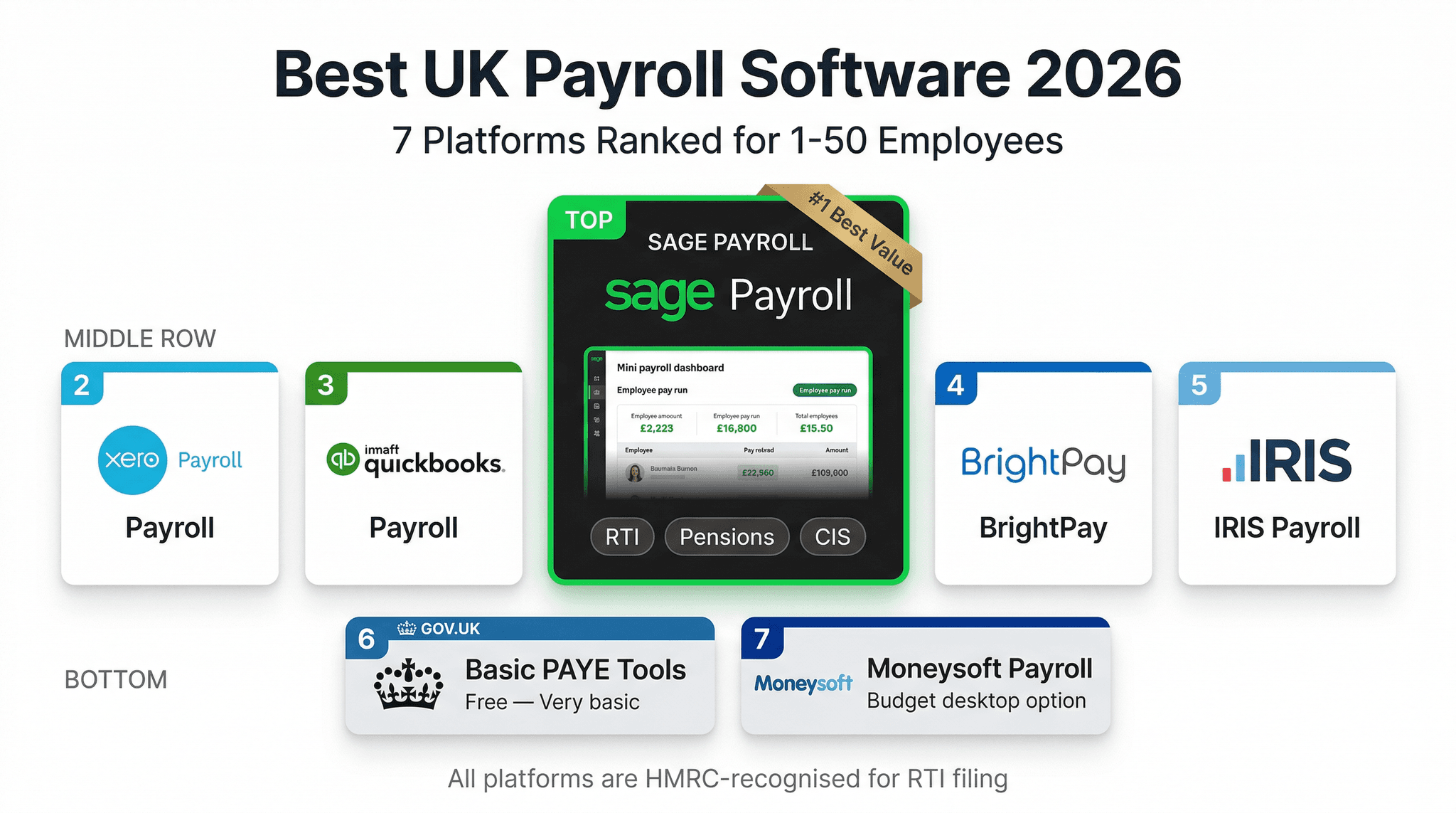
Payroll is the accounting task that least tolerates error. Pay your employees incorrectly, miss an RTI submission, or miscalculate a statutory sick pay entitlement, and you face a combination of angry employees, HMRC penalties, and reconciliation work that can take hours to untangle. Unlike annual accounts — which can be adjusted — payroll errors compound: an incorrect tax code applied in April creates an underpayment that follows an employee through the entire tax year.
For UK small businesses with one to fifty employees, the payroll software market offers a wide range of options — from HMRC's own free tool (limited but functional) through to comprehensive cloud platforms that handle everything from new starter onboarding to year-end P60 distribution. This guide compares seven payroll solutions on the criteria that matter most to small business owners: pricing, compliance coverage, ease of use, and integration with your wider accounting software.
For businesses with 5 or more employees, dedicated payroll software pays for itself almost immediately in time saved and error reduction. Sage Payroll Essentials at £10 per month (5 employees included) is the most cost-effective entry point among the paid options, with a clear upgrade path as your headcount grows. HMRC Basic PAYE Tools is genuinely useful for 1-3 employees but becomes unwieldy beyond that.
What UK Payroll Software Must Do: The Non-Negotiables
Before comparing products, it is worth establishing the baseline compliance requirements that every UK payroll system must meet. These are not optional extras — they are legal obligations:
Real Time Information (RTI) Filing
Since April 2013, UK employers must submit a Full Payment Submission (FPS) to HMRC on or before each payday. The FPS contains details of every employee's pay and deductions for that period. Missing an FPS or submitting it late triggers automatic penalties. Most payroll software submits the FPS directly to HMRC via the Government Gateway API — this is the fundamental minimum requirement for any payroll tool you use.
PAYE Tax and National Insurance Calculations
Your payroll software must calculate income tax under the PAYE system (using each employee's tax code and the current tax bands) and National Insurance contributions (both employee and employer) for each pay period. These calculations must reflect the current rates — in 2026, the standard employee NI rate is 8% on earnings above the primary threshold, with employer NI at 15% above the secondary threshold. The software must update automatically when rates change at the start of each tax year.
Statutory Payments
UK employers must calculate and pay statutory sick pay (SSP), statutory maternity pay (SMP), statutory paternity pay (SPP), statutory adoption pay (SAP), and statutory parental bereavement pay (SPBP) according to HMRC's rules. The calculations involve qualifying periods, waiting days, and weekly earnings tests that are genuinely complex to calculate manually. Good payroll software automates these calculations when you record the relevant absences or leave periods.
Auto-Enrolment Pension Contributions
Under the auto-enrolment regime, eligible employees must be automatically enrolled into a qualifying pension scheme, with minimum contributions of 8% of qualifying earnings (at least 3% from the employer and 5% from the employee, though your scheme may have higher rates). Payroll software must calculate pension deductions correctly, deduct them from employee pay, and report contributions to your pension provider. Most platforms integrate with the major UK workplace pension providers — NEST, NOW: Pensions, The People's Pension, and Smart Pension.
Year-End Documents
At the end of each tax year (5 April), employers must issue P60 certificates to all employees who were employed on 5 April, showing total pay and deductions for the year. P45 forms must be issued when an employee leaves. P11D forms are required by 6 July each year for any employees who have received taxable benefits in kind. Your payroll software must generate all of these documents to the correct format.
The Seven Contenders
1. Sage Payroll — Best Value for 5+ Employees
Sage Payroll comes in three tiers, all hosted in the cloud and connecting directly to HMRC for RTI submissions:
- Sage Payroll Essentials — £10/month: Includes 5 employees, plus £2 per additional employee per month. Covers RTI, auto-enrolment, P60/P45 generation, and basic payslips. Integration with Sage Accounting Standard is seamless — payroll journal entries post automatically to your accounts.
- Sage Payroll Standard — £20/month: Includes 5 employees, plus £4 per additional employee. Adds advanced reporting, custom payslip branding, HR data fields, and more detailed statutory pay management. Better suited to businesses with 15-50 employees.
- Sage Payroll Premium — £30/month: Includes 5 employees, plus £6 per additional employee. Adds employee self-service (employees can view payslips and P60s via a mobile app), absence management, and timesheet integration. Most suitable for businesses approaching 50 employees who need to reduce HR admin overhead.
Sage Payroll's key advantage over the competition is its integration with Sage Accounting. If you use Sage Accounting Standard or Plus for your bookkeeping, payroll data flows across automatically — payroll costs are coded to the correct nominal accounts, PAYE and NI liabilities appear on the balance sheet, and pension contributions are recorded without any manual journal entry. This eliminates a monthly reconciliation task that takes many small businesses 30-60 minutes to complete when using separate payroll and accounting tools.
Note that Sage Accounting Standard already includes bundled payroll for up to five employees at no additional charge. If you have five or fewer employees and are already on Sage Accounting Standard, you may not need a separate Sage Payroll subscription at all — the bundled payroll handles RTI, auto-enrolment, P60/P45, and SSP/SMP/SPP calculations within the accounting plan you are already paying for.
Sage Payroll also supports CIS payroll — handling the specific requirements for subcontractors paid through the payroll rather than as invoiced subcontractors. This is relevant for construction businesses that engage workers on a PAYE basis but within the CIS framework.
2. Xero Payroll — Best for Xero Accounting Users
Xero Payroll is available as part of the Xero Comprehensive plan (£50 per month, which includes payroll for up to five employees) or as a standalone add-on to Grow plans. Like Sage, Xero Payroll's biggest strength is its native integration with Xero Accounting — payroll journals post automatically and bank reconciliation of payroll payments is straightforward.
Key features include RTI filing, auto-enrolment (with integrations to NEST and other providers), P60/P45 generation, SSP/SMP calculations, and employee self-service via the Xero Me app. The user interface is clean and well-regarded for ease of use.
The limitation: for businesses with more than five employees on the Grow plan, there is typically an additional per-employee charge. And for businesses not already using Xero for accounting, there is no compelling reason to choose Xero Payroll over Sage, BrightPay, or Moneysoft — the integration benefit only materialises if you are on the Xero accounting platform.
3. QuickBooks Payroll — Reasonable for QuickBooks Accounting Users
QuickBooks Payroll is priced at £8 per month plus £2 per employee per month. It integrates directly with QuickBooks accounting and covers the core compliance requirements: RTI, auto-enrolment (NEST integration), P60/P45, and statutory pay calculations.
For businesses with 10 employees, the monthly cost is £28 (£8 base + £20 employee fee), versus Sage Payroll Essentials at £20 (£10 base + £10 for 5 extra employees). QuickBooks therefore becomes less competitive at moderate headcount. The auto-enrolment features are functional but require slightly more manual configuration than Sage when setting up pension schemes other than NEST.
QuickBooks Payroll does generate employee payslips and supports the major statutory pay types. It is a reasonable choice if you are already using QuickBooks for accounting and want to avoid the complexity of a separate payroll tool.
4. BrightPay — Best Value One-Off Licence Option
BrightPay takes a different commercial approach from the cloud subscription models above. It is available as an annual desktop licence for approximately £139 per year (for the standard employer version), covering an unlimited number of employees. There is also a cloud version, BrightPay Connect, at an additional monthly cost for features like employee self-service, automatic backups, and payroll approval workflows.
BrightPay has an excellent reputation among UK payroll professionals and accountants. Its statutory pay calculations — particularly for complex SMP scenarios involving changes in hours or pay during the qualifying period — are regarded as among the most accurate in the market. The auto-enrolment module is comprehensive, supporting all major pension providers with direct data feeds to NEST, NOW: Pensions, The People's Pension, Smart Pension, and others.
The limitation for small businesses is the desktop-first architecture. The base licence runs on a Windows PC; cloud backups and mobile access require the additional BrightPay Connect subscription. For a business owner who wants to process payroll from any device without managing software installations, a cloud-native option like Sage or Xero is more convenient.
BrightPay is particularly popular with accounting practices that run payroll for multiple employer clients — the practice licence covers unlimited employers and employees — but for a single small business, the annual licence model and desktop installation may feel dated compared to modern cloud alternatives.
5. IRIS Payroll — Enterprise Strength, Higher Price Point
IRIS Payroll is the payroll product used by many mid-sized and larger UK businesses, as well as accounting practices that need depth of functionality. Pricing starts from approximately £850 per year for the smallest version and increases significantly with the number of employees and features required.
IRIS is overkill for most businesses with 1-50 employees. The depth of functionality — detailed analysis codes, complex benefit calculations, multi-company consolidation, HMRC auto-update of tax codes, integration with IRIS practice software — is appropriate for larger businesses with complex payroll requirements. For a small business, the cost-to-value ratio is unfavourable compared to Sage, BrightPay, or even Xero.
Consider IRIS if you have an accountant who already uses IRIS practice software and wants to run your payroll within that ecosystem, or if you anticipate rapid headcount growth that will take you beyond the 50-employee range in the near term.
6. Moneysoft Payroll Manager — Best Low-Cost Desktop Option
Moneysoft Payroll Manager is a desktop-based payroll application priced from approximately £70 per year (including a single company licence). It is less well-known than the cloud alternatives but has a loyal following among small businesses and sole director companies who want a straightforward, low-cost payroll tool without a monthly subscription.
Moneysoft covers all the essential compliance requirements: RTI filing, auto-enrolment calculations (though not direct pension provider integration), P60/P45 generation, and statutory pay calculations. The interface is functional rather than polished — it lacks the consumer-grade design of Sage or Xero — but the calculations are accurate and the HMRC submissions work reliably.
Moneysoft does not integrate with cloud accounting software, so payroll journals need to be entered manually in your accounts package after processing in Moneysoft. This manual step — typically a monthly journal of five to ten entries — is manageable for a very small business but becomes tiresome for larger teams.
Moneysoft is an excellent choice for a sole director limited company with no employees (director-only payroll), or a business with one or two employees where the annual licence cost significantly undercuts the monthly subscription alternatives.
7. HMRC Basic PAYE Tools — Free, But Limited
HMRC offers its own free payroll software, Basic PAYE Tools (BPT), which is available to download from the HMRC website. It handles RTI submissions, PAYE tax and NI calculations, and basic payslip information. It is genuinely suitable for small employers with up to nine employees who do not need the additional features of paid software.
What HMRC Basic PAYE Tools does:
- Full Payment Submissions (FPS) directly to HMRC
- Employer Payment Summaries (EPS) for reclaimable statutory payments
- PAYE tax and NI calculations using correct rates
- P60 and P45 generation
- Basic payslip information (though not formatted payslips to hand to employees)
What HMRC Basic PAYE Tools does not do:
- Auto-enrolment calculations or pension provider integration
- Statutory pay calculations (SSP, SMP, etc.) — these must be calculated manually
- Formatted employee payslips — you must produce these yourself
- Integration with accounting software
- P11D benefits reporting
- Holiday and absence management
The missing auto-enrolment and statutory pay features are meaningful gaps. Auto-enrolment is a legal requirement from the employer's first eligible employee; the calculation of SMP and SSP involves qualifying rules and earnings tests that are genuinely complex to get right manually. For a business with even one employee, these gaps make BPT a risky sole solution. It works best as a temporary measure while you get your first payroll set up, or for a sole director limited company with no other employees and no employee benefits to administer.
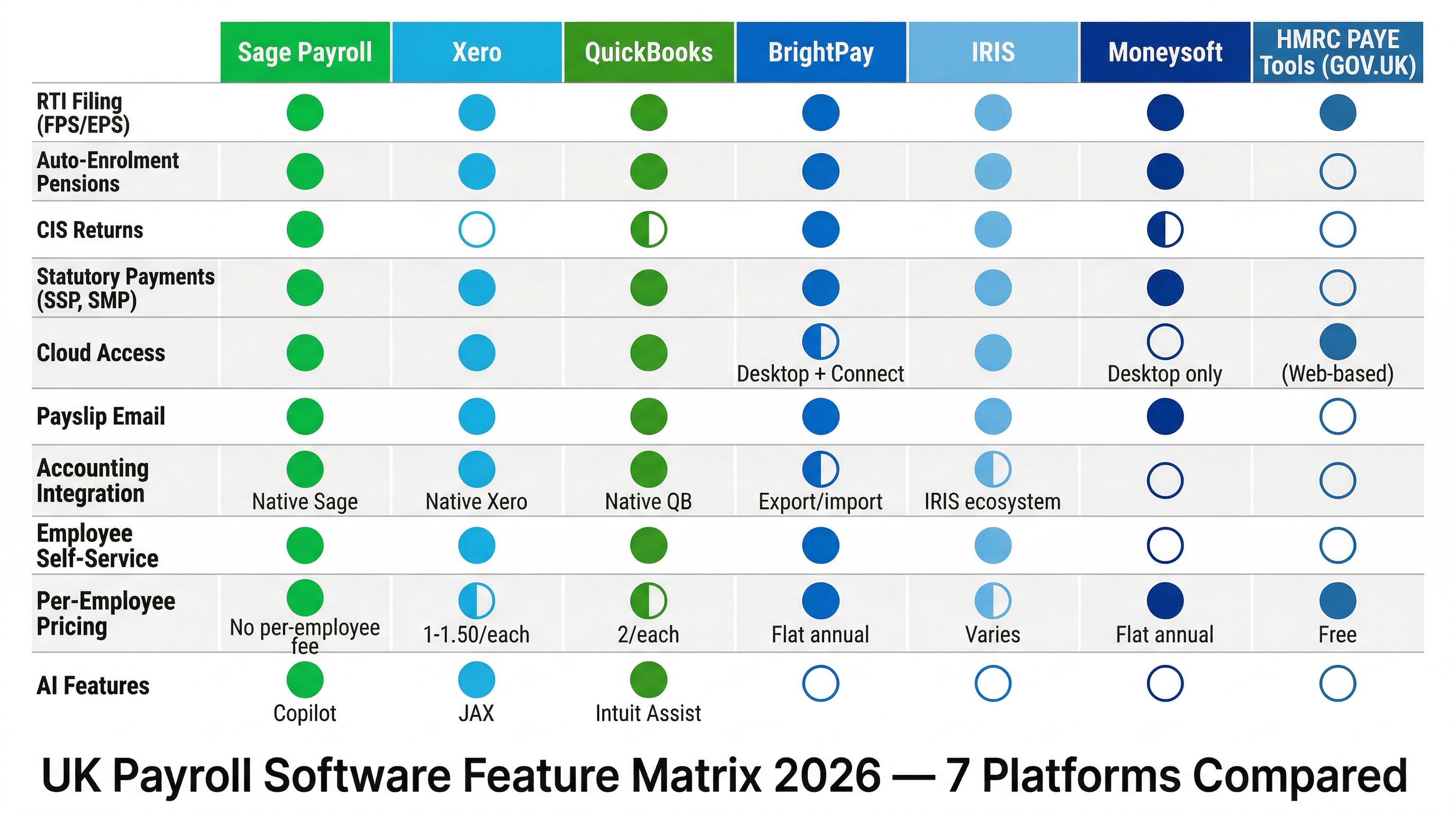
Full Comparison: UK Payroll Software 2026
| Software | Monthly Cost | Per Employee | RTI Filing | Auto-Enrolment | SSP/SMP/SPP | P60/P45 | Accounting Integration |
|---|---|---|---|---|---|---|---|
| Sage Payroll Essentials | £10 (5 included) | £2/extra emp | Yes | Yes — all providers | Automated | Auto-generated | Native Sage sync |
| Sage Payroll Standard | £20 (5 included) | £4/extra emp | Yes | Yes | Automated | Auto-generated | Native Sage sync |
| Xero Payroll (Comprehensive) | £50 (includes payroll) | Additional above 5 | Yes | Yes — NEST + others | Automated | Auto-generated | Native Xero sync |
| QuickBooks Payroll | £8 base | £2/employee | Yes | Yes — NEST focus | Automated | Auto-generated | Native QB sync |
| BrightPay | ~£139/yr (£11.58/mo) | Unlimited incl. | Yes | Yes — all providers | Highly accurate | Auto-generated | Manual export |
| IRIS Payroll | From ~£850/yr (~£71/mo) | Varies by plan | Yes | Yes — comprehensive | Yes | Auto-generated | IRIS practice sync |
| Moneysoft | ~£70/yr (~£5.83/mo) | Unlimited incl. | Yes | Basic only | Manual assist | Auto-generated | Manual export |
| HMRC Basic PAYE Tools | Free | Free (up to 9 emp) | Yes | Not included | Manual only | P60 only | None |
Cost Comparison at Different Employee Counts
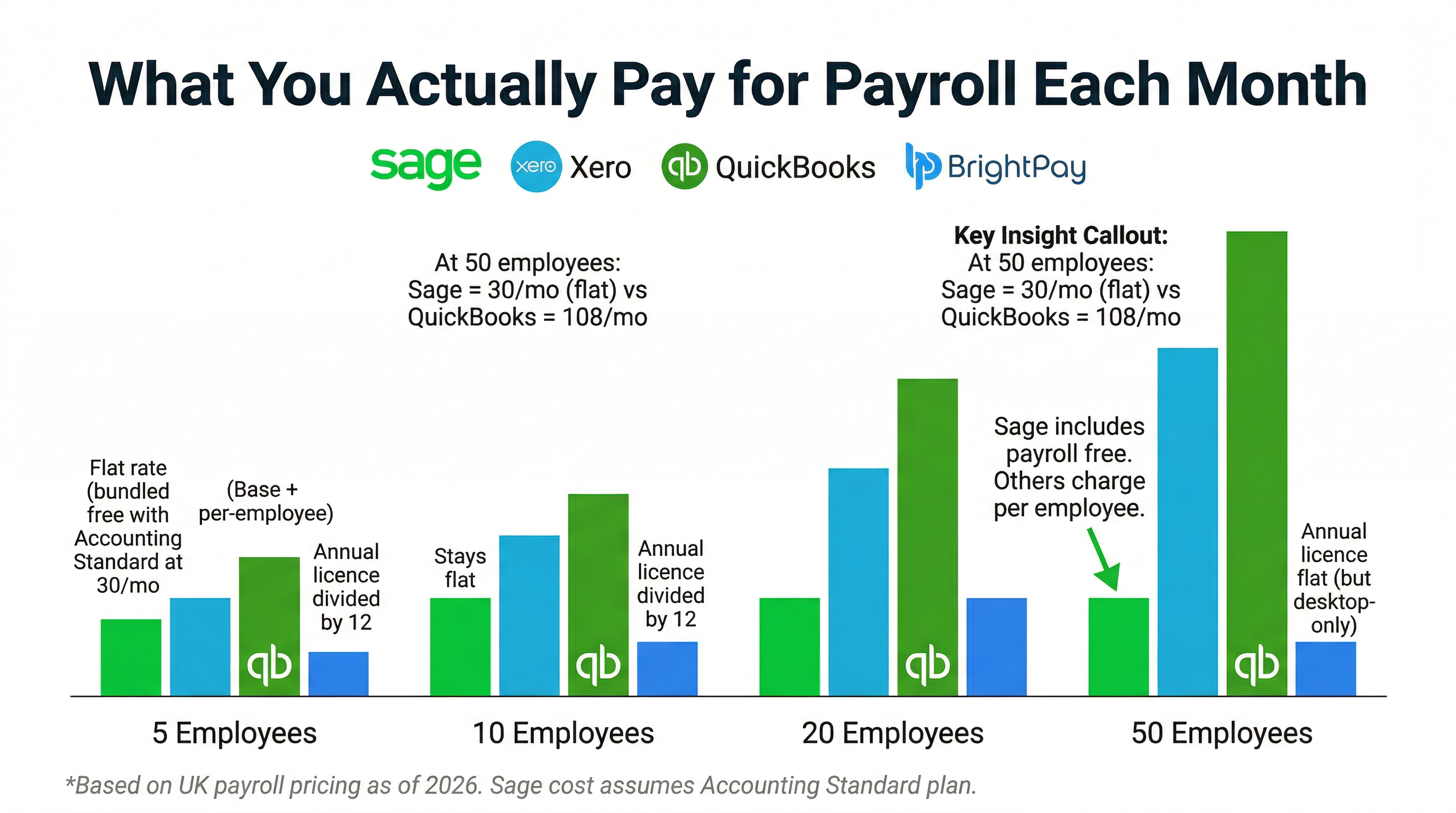
To make pricing comparisons concrete, here is what each solution costs per month for businesses of different sizes. All figures exclude VAT.
| Software | 1 Employee | 5 Employees | 10 Employees | 25 Employees | 50 Employees |
|---|---|---|---|---|---|
| Sage Payroll Essentials | £10 | £10 | £20 | £50 | £100 |
| Sage Payroll Standard | £20 | £20 | £40 | £100 | £200 |
| QuickBooks Payroll | £10 | £18 | £28 | £58 | £108 |
| BrightPay (annual) | ~£11.58 | ~£11.58 | ~£11.58 | ~£11.58 | ~£11.58 |
| Moneysoft (annual) | ~£5.83 | ~£5.83 | ~£5.83 | ~£5.83 | ~£5.83 |
| HMRC Basic PAYE Tools | Free | Free | Free (but limited) | Not recommended | Not suitable |
BrightPay's unlimited-employee annual licence makes it significantly cheaper on a per-employee basis for larger teams. However, the true cost of BrightPay for cloud features (BrightPay Connect, for remote access and employee self-service) adds to the base licence cost. And the time cost of manual accounting integration — entering payroll journals manually each month — partially offsets the lower software price.
Key Payroll Compliance Topics in Depth
Real Time Information (RTI): How It Works in Practice
RTI requires a Full Payment Submission before or on the day employees are paid. If you pay weekly, that is 52 FPS submissions per year. If you pay monthly, 12. The FPS must include every employee's year-to-date figures, not just the current period — so errors in one period compound until corrected. An Earlier Year Update (EYU) or additional FPS with corrections is required if you discover an error after the tax year end.
All the paid software options in this comparison submit FPS automatically when you finalise each payroll run. HMRC Basic PAYE Tools requires you to manually trigger each submission. The difference sounds trivial but matters when you are processing payroll at 4pm on a payday Friday with other things demanding your attention.
Auto-Enrolment: The Common Mistakes
Auto-enrolment errors are one of the most common compliance issues for small businesses, partly because the rules are more nuanced than employers realise:
- Postponement periods: Employers can postpone auto-enrolment for new starters for up to three months, but must write to the employee within six weeks of their start date to inform them of the postponement. Missing the letter is itself a compliance failure.
- Re-enrolment: Every three years, you must re-enrol eligible employees who have previously opted out. The re-enrolment date is based on your original staging date, not on when individual employees opted out.
- Contribution rates: The minimum contribution rates are 3% employer and 5% employee on qualifying earnings. "Qualifying earnings" excludes the lower earnings limit — in 2026, roughly the first £6,240 of earnings are excluded from the pension calculation. Some employers accidentally calculate contributions on total pay rather than qualifying earnings, underpaying into the pension scheme.
Sage Payroll and BrightPay both automate postponement letter generation and re-enrolment tracking. HMRC Basic PAYE Tools and Moneysoft leave these steps largely manual.
Statutory Sick Pay (SSP)
SSP is payable to eligible employees who are ill for four or more consecutive days (including non-working days). The rate in the 2025-26 tax year is £116.75 per week. Eligibility requires average weekly earnings at or above the Lower Earnings Limit (£123 per week in 2025-26). Employees can self-certify for up to seven days; beyond that, a medical certificate (fit note) is required.
The calculation of SSP daily rates (dividing the weekly rate by the number of qualifying days in the week) is straightforward in principle but requires tracking which days are qualifying days in each employee's contract. Good payroll software stores each employee's working pattern and automates the daily rate calculation accordingly.
Statutory Maternity Pay (SMP)
SMP is the most complex of the statutory payments. It requires calculating the employee's average weekly earnings over a specific eight-week reference period, confirming eligibility (26 weeks' continuous service and average earnings above the Lower Earnings Limit at the 15th week before the expected week of childbirth), and paying at the higher of 90% of average weekly earnings or the standard SMP rate (£184.03 per week in 2025-26) for the first six weeks, then the standard rate for up to 33 further weeks.
Employers can recover 92% of SMP paid through their PAYE Employer Payment Summary. Small employers (those whose total employer NI in the previous year was £45,000 or less) can recover 103% — getting back slightly more than they paid out to compensate for the administration cost. Your payroll software should handle both the SMP calculation and the EPS recovery claim automatically.
P11D Benefits in Kind
If you provide taxable benefits to employees — company cars, private medical insurance, gym memberships, interest-free loans above £10,000, or other non-cash benefits — you must report these on form P11D by 6 July following the end of the tax year. The employer also pays Class 1A National Insurance (13.8% in 2026) on the value of the benefits.
Sage Payroll Standard and Premium include P11D management. Xero Payroll handles basic benefit recording. QuickBooks Payroll has limited P11D functionality. BrightPay and Moneysoft have P11D modules of varying completeness. If your business provides significant benefits in kind, confirm P11D support before committing to a payroll platform.
CIS and Payroll: Special Considerations for Construction
Construction businesses face a specific payroll complexity: some workers may be engaged through the payroll (PAYE employees) while others are engaged as CIS subcontractors (self-employed). Workers incorrectly classified as self-employed when they are actually employees create significant HMRC liability — the employer becomes responsible for unpaid PAYE tax and NI contributions for the relevant period.
Sage Payroll integrates with Sage Accounting Standard's CIS module, allowing you to manage both PAYE employees and CIS subcontractors within the same system. This reduces the risk of misclassification errors and simplifies the monthly reconciliation of PAYE and CIS liabilities.
Who Should Choose What: Our Verdict
Best for 1-3 Employees on a Very Tight Budget: HMRC Basic PAYE Tools + Manual Processes
If you have one to three employees, are not yet VAT registered, and have the time and confidence to manage auto-enrolment and statutory pay manually, HMRC Basic PAYE Tools is genuinely usable. It handles RTI correctly and costs nothing. Accept the limitations and budget the time for manual compliance steps.
- Zero cost — saves £120-240/year versus entry-level paid options
- RTI submissions work correctly
- Suitable for director-only limited companies with no other employees
- Requires manual auto-enrolment management if you have eligible employees
Best for 1-50 Employees Using Sage Accounting: Sage Payroll Essentials
If you use any Sage accounting product, Sage Payroll Essentials is the obvious choice. The native integration eliminates monthly journal entries, the auto-enrolment module handles all major pension providers, and the bundled payroll within Sage Accounting Standard means you may not even need a separate Sage Payroll subscription if you have five or fewer employees.
- £10/month for up to 5 employees — best value paid entry point
- Native integration with Sage Accounting — no manual journals
- Full auto-enrolment and statutory pay automation
- UK phone support included
- Upgrade to Standard or Premium as you grow, without switching platforms
Best for 10-50 Employees Wanting Lowest Per-Employee Cost: BrightPay
BrightPay's unlimited-employee annual licence is the most cost-effective option for businesses with 10 or more employees who are comfortable with a desktop-first tool. The statutory pay calculations are excellent, and the auto-enrolment module supports all major pension providers. Accept the manual accounting integration and the Windows desktop requirement.
- ~£139/year regardless of employee count — exceptional value above 10 employees
- Highest-rated statutory pay calculation accuracy
- All major pension provider integrations
- Add BrightPay Connect for cloud access and employee self-service
Best for Xero or QuickBooks Accounting Users: Their Native Payroll
If you are already committed to Xero or QuickBooks for accounting, using the native payroll avoids the manual accounting integration problem. Xero Payroll within the Comprehensive plan is particularly well-regarded for ease of use. QuickBooks Payroll is cost-effective at lower headcount but becomes less competitive above 10 employees.
- Xero Comprehensive: payroll included — no additional subscription for 5 employees
- QuickBooks Payroll: good at 1-8 employees; less competitive at higher headcount
- Both handle RTI, auto-enrolment, and statutory pay correctly
- Native accounting integration eliminates manual journal work
The most important principle in choosing payroll software is not to let price alone drive the decision. Payroll errors — missed RTI submissions, incorrect auto-enrolment, miscalculated SMP — can cost far more to correct than a year's software subscription. Choose a tool that automates the compliance steps you are least confident handling manually, and ensure it integrates cleanly with your accounting software to prevent double-entry errors. For most UK small businesses with five or more employees, the time saved by a modern cloud payroll platform pays for itself within the first two or three months of use.